



Mekari Insight
- Enterprise low-code platform is an application development tool that can help large companies to build, customize, and deploy business softwares using visual development platforms with minimal manual coding.
- Several top recommendations of enterprise low-code platforms include Mekari Officeless Studio, Mendix, and ManageEngine App Creator, which works perfectly for large companies due to their advanced features and capabilities.
- Mekari Officeless Studio excels as the best enterprise low-code platform for global and multi-national companies that want to expand to Indonesia due to its seamless integration with Mekari’s unified software ecosystem, built-in compliance with Indonesian regulations, and localized onboarding support that accelerates time-to-value.
Many enterprises still rely on legacy systems that make application development slow and difficult to scale.
A Deloitte survey shows that 30% of companies in the UK said that their organisation lacked a digital transformation strategy “to a large extent” and 37% of them are because of dependency on legacy systems.
These constraints increase integration complexity and extend delivery schedules for new apps.
To overcome these limitations, companies are increasingly adopting enterprise low-code platforms that simplify application development while working alongside existing systems.
These low-code platforms could help enterprises build internal applications, automate workflows, and integrate systems more efficiently without rebuilding everything from scratch.
In this article, we will explain what enterprise low-code platforms are and highlight some of the best platforms enterprises can use today.
What Is an Enterprise Low Code Platform and What It Serves?
Enterprise low-code platforms are software development tools that enable large companies to build, customize, and deploy business applications using visual development platforms with minimal manual coding.
These platforms are designed to accelerate application development while maintaining the scalability, security, and governance standards required by large organizations.
In enterprise environments, low-code application platforms (LCAPs) are commonly used to modernize legacy processes, automate workflows, and create internal applications that support complex business operations.
Unlike traditional development approaches that rely heavily on programming from scratch, enterprise low-code platforms provide streamlined app development processes through visual interfaces, prebuilt components, and API integrations.
Because of their flexibility and integration capabilities, these platforms can be applied across various departments such as operations, finance, HR, and customer service.
Read More: Guide to Choose Low Code vs Traditional DevelopmentBenefits of Low Code Development Platform for Enterprises
Low-code development platforms serve many advantages for enterprises. Here are some of the benefits of implementing enterprise low-code platforms for large companies:
1. Accelerate Development Process
LCAPs enable teams to build and deploy applications faster using visual builders, prebuilt components, and automated workflows instead of writing code from scratch.
Mendix survey showed that 73% of respondents said that low-code platforms improved their app time-to-market.
2. Enhance Accessibility
Allow citizen developers (non-technical teams) such as operations, finance, or HR to participate in software development processes through intuitive drag-and-drop interfaces.
3. Optimize Development Cost
Reduce development expenses by minimizing the need for large engineering teams and shortening the time required to build and maintain applications.
Mendix reported that 79% of respondents said that enterprise low-code platforms reduce their operating costs.
Read More: Enterprise Software Development Guide: The 2.5-Year ROI Path4. Strengthen Collaboration between Development Teams
Provide shared development environments where IT teams, developers, and business stakeholders can work together more effectively on the same platform.
5. Increase Productivity
Automate repetitive development tasks and streamline workflows so teams can focus on building features that directly support business operations.
80% of enterprises said that low-code highly improved their productivity at work. – Mendix Survey
6. Better Scalability
LCAPs empower both IT teams and business stakeholders to contribute directly to software development processes, helping enterprises build solutions more efficiently.
Common Use Cases of Low Code Platform in Enterprises
Enterprise low-code platforms are frequently used where speed, integration, and close alignment with business processes matter most. Below are the common use cases of LCAPs in large enterprises:
- Workflow Automation: Build automated approval flows, document routing, and orchestration for cross-department processes so manual handoffs and paperwork are reduced.
- Internal Tools & Applications: Create HR, finance, and operations apps (onboarding, expense claims, inventory lookups) tailored to internal needs without long engineering cycles.
- CRM Software Extensions: Extend existing CRMs or launch customer service portals quickly to support new product offerings or campaigns.
- Legacy Modernization & Integration Layer: Use low-code as a system integrator and facade layer that connects legacy systems to modern UIs and APIs without a full replatform.
- Field Service & Mobile Apps: Deliver mobile forms, inspections, and dispatch apps faster so frontline teams can operate offline and report data in real time.
- Compliance, Audit, and Reporting Dashboards: Build role-based dashboards and compliance trackers that pull data from multiple systems for audit and regulatory needs.
- Rapid Prototyping & MVPs: Prototype ideas and validate requirements with users quickly, reducing rework by capturing feedback early in the build cycle.
Mandatory Features of Enterprise Low-Code Platforms
When evaluating enterprise low-code platforms, companies should look beyond drag-and-drop development capabilities.
Enterprise-grade platforms must support complex architectures, governance, security, and scalability so applications can scale across multiple teams and business units.
According to industry analysts, enterprise low-code platforms are expected to provide a combination of visual development tools, integration capabilities, security, and runtime infrastructure that support the full application lifecycle—from development to deployment and maintenance.
1. Visual Development Workspace (IDE)
Enterprise LCAPs must provide visual development tools or integrated development environments that allow developers to build applications with minimal coding while still supporting UI creation, workflow automation, and business rules.
2. AI Capabilities
Modern enterprise low-code platforms should also include AI capabilities that help generate UI components, workflows, integrations, or application logic to accelerate development and reduce manual configuration.
3. Multi-level Environment & Release Management
An enterprise-grade platform should support multi-level environments, such as Development, Testing, and Production.
With this feature, teams can safely build, test, and deploy applications without disrupting live operations.
Enterprise-grade LCAPs should also provide versioning and release channels. This allows teams to track application changes, publish controlled updates, and roll back to previous versions if issues occur after deployment.
4. Reusable Plugin & Component Builder
Some enterprise applications require functionality that goes beyond standard platform capabilities.
A custom plugin and extension framework enables developers to build reusable action blocks that connect to external APIs, internal systems, or specialized services. Once created, these plugins can be embedded into workflows and reused across multiple applications.
This approach allows teams to standardize integrations while still maintaining flexibility to implement custom business logic when needed.
5. Integration & Connection
Modern enterprise applications rarely operate in silos and isolation. Most business processes depend on multiple systems—such as ERP, CRM, HRIS, payment platforms, or data warehouses—that must exchange data and trigger actions across workflows.
To support this unified ecosystem, an enterprise low-code platform should provide built-in integration and connection capabilities. This includes API connectivity, external service connectors, and data synchronization tools.
These features allow applications to interact with other systems, automate cross-platform processes, and ensure that data flows consistently across the organization.
Read More: CRM & Accounting Integration: Real Use Cases & Best Software6. Workflow Automation
Many enterprise processes still rely on manual coordination across teams, emails, and spreadsheets. As organizations grow, these fragmented workflows can slow down operations, increase the risk of human error, and make it harder to maintain consistent processes.
Therefore, a robust enterprise low-code platform should include a workflow automation engine that allows teams to design multi-step processes with triggers, conditions, and automated actions.
These workflows can orchestrate approvals, notifications, task assignments, and system integrations, ensuring that processes run consistently and efficiently across departments.
7. Insights & Data Analytics
Custom enterprise software needs visibility into operational data across multiple systems and workflows.
Therefore, an enterprise-grade low-code platform should provide built-in analytics capabilities that allow teams to consolidate data from connected sources, generate structured reports, and build interactive dashboards.
With centralized reporting and real-time performance tracking, organizations gain a reliable single source of truth to monitor KPIs, identify trends, and support more informed, data-driven decisions.
Read More: Top 10 No-Code Database Software Builder for Businesses9 Best Enterprise Low Code Platforms in 2026
Choosing the right low-code vendor matters because enterprises need a platform that covers all features mentioned above–visual development workspace, integration, AI, to integration, and release management.
These are the 9 best enterprise low-code platforms for 2026 based on those criteria and have a strong background in serving enterprises:
1. Mekari Officeless Studio
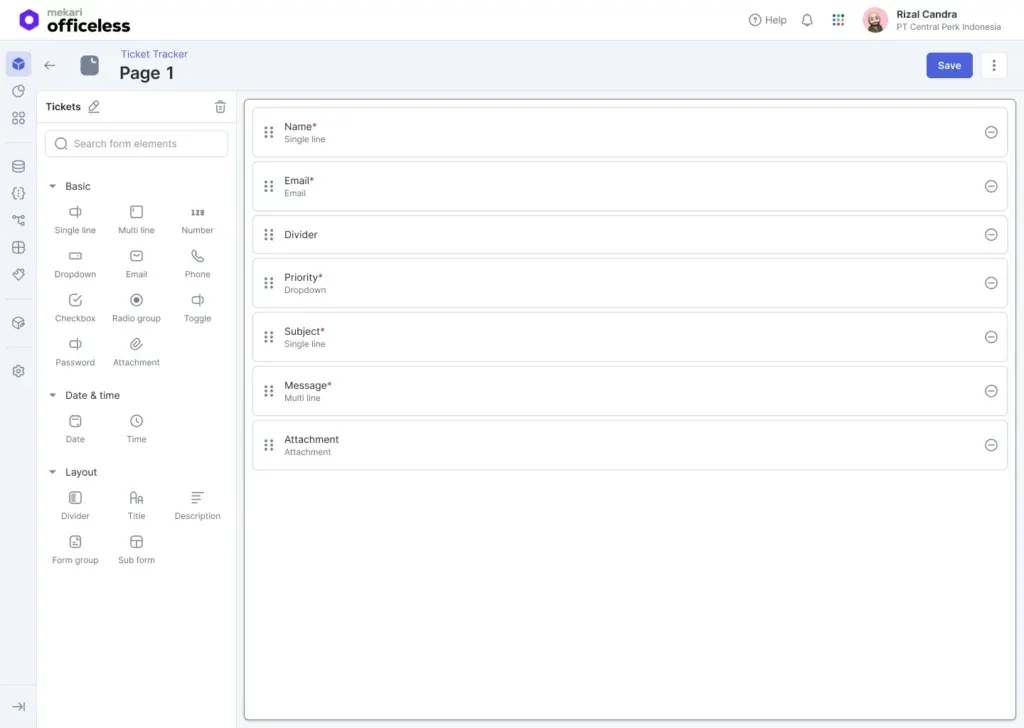
Mekari Officeless Studio is a business app builder with low-code capabilities to democratize software development across organizations.
This enterprise low-code platform enables both citizen developers and professional engineers to build enterprise-grade internal applications for operations, workflows, and business processes with an accelerated development cycle.
By providing a unified environment for application development, automation, integrations, and analytics, Mekari Officeless Studio helps enterprises accelerate internal digital transformation initiatives while maintaining governance and scalability.
Key features:
- Visual Application Builder: A drag-and-drop interface that allows teams to design application interfaces, data models, and workflows quickly without extensive coding.
- AI Assistance: Built-in AI tools help users generate application components, workflow automation logic, and accelerate development workflows through an intuitive interface.
- Environment & Release Management: Supports multi-environment deployment (such as development and production) with versioning, release channels, and rollback capabilities.
- Plugin Builder: Allows developers to create custom plugins or prebuilt action blocks to extend application functionality and integrate specialized business logic.
- Prebuilt app marketplace: A curated marketplace of ready-to-deploy applications and modules that enterprises can quickly implement and customize to accelerate development processes and digital initiatives.
- Integration & Connections: Provides prebuilt connectors and API-based integrations that allow applications to communicate with Mekari’s unified ecosystem, internal legacy systems, and external services.
- Workflow Automation: A workflow engine that enables teams to design automated processes with triggers, conditions, approvals, and notifications.
- Insight Analytics: Built-in reporting and dashboard tools that consolidate data across applications and visualize performance metrics to build a single source-of-truth for better operational visibility.
With these capabilities, Mekari Officeless Studio has enabled enterprises to modernize legacy workflows, centralize operational systems, and significantly improve operational excellence across departments. Here are some of the portfolio examples:
- Coca Cola: Modernized legacy system that previously relied on outdated browsers with 70% increased speed in data exports and app development process.
- Infomedia Nusantara: Accelerated internal application development and reduced typical project timelines from 3–6 months to around 1 month while still adapting easily to changing user requirements.
- JNE: Built an internal app to centralize dispatch and package tracking between warehouses and field couriers, helping reduce delivery disputes by 40% while improving nationwide logistics coordination.
With those features and proven track records across major enterprises, Mekari Officeless studio is well suited for enterprises that want to build enterprise applications rapidly while supporting broader digital transformation initiatives across departments.
2. ManageEngine AppCreator
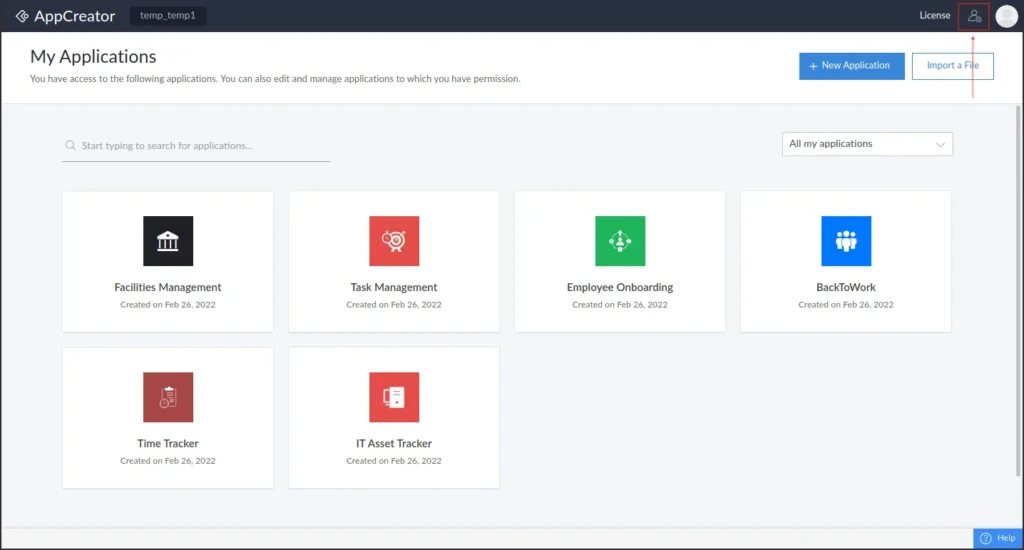
ManageEngine AppCreator is a low-code platform aimed at IT and business teams for quickly building multi-device enterprise applications and automating workflows.
This enterprise LCAP emphasizes on-premises or cloud deployment options and tight integration with the ManageEngine product family to support IT operations and business processes.
Key features:
- Multi-device app builder: Design apps once and deploy them as web apps and mobile PWAs with responsive layouts for desktop and field users.
- Workflow automation: Drag-and-drop workflow designer for approvals, orchestration, and scheduled tasks to reduce manual handoffs.
- Prebuilt connectors & REST APIs: Out-of-the-box integrations with ManageEngine products and generic REST endpoints to simplify system connectivity.
- Mobile SDK & offline support: Tools to package and publish native or branded mobile experiences for frontline teams.
3. GeneXus
GeneXus is an agentic low-code platform that generates native code across multiple targets and incorporates AI to automate parts of the development lifecycle.
This platform targets companies that need future-proof, high-performance applications while minimizing long-term technical debt.
Key features:
- Model-driven code generation: Define business models and let the platform generate maintainable native code for multiple runtimes.
- AI-enhanced development: AI assistants and automation reduce manual effort in design, testing, and code evolution.
- Cloud & platform portability: Support for multiple cloud providers and deployment targets to avoid vendor lock-in.
4. OutSystems
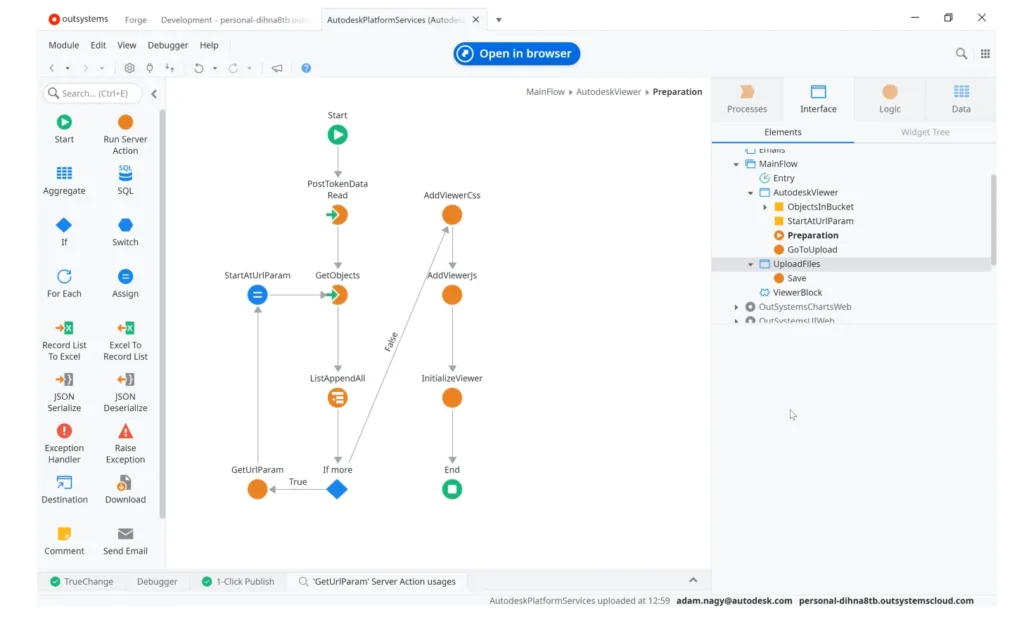
OutSystems is an enterprise low-code platform that combines visual development tools with AI capabilities to accelerate full-stack application delivery and lifecycle governance.
This software development tool focuses on delivering secure, scalable apps with strong SDLC controls for complex enterprise use cases.
Key features:
- Visual IDE: Drag-and-drop development for UI, business logic, and data models with pro-code extensibility.
- AI-assisted development: Built-in AI helpers and agent frameworks speed scaffolding, testing, and operational automation.
- Governance & SDLC: Built-in versioning, deployment pipelines, and monitoring to manage apps from dev to production.
- Extensive component marketplace & integrations: Prebuilt connectors, templates, and reusable components to shorten time-to-value.
5. Mendix
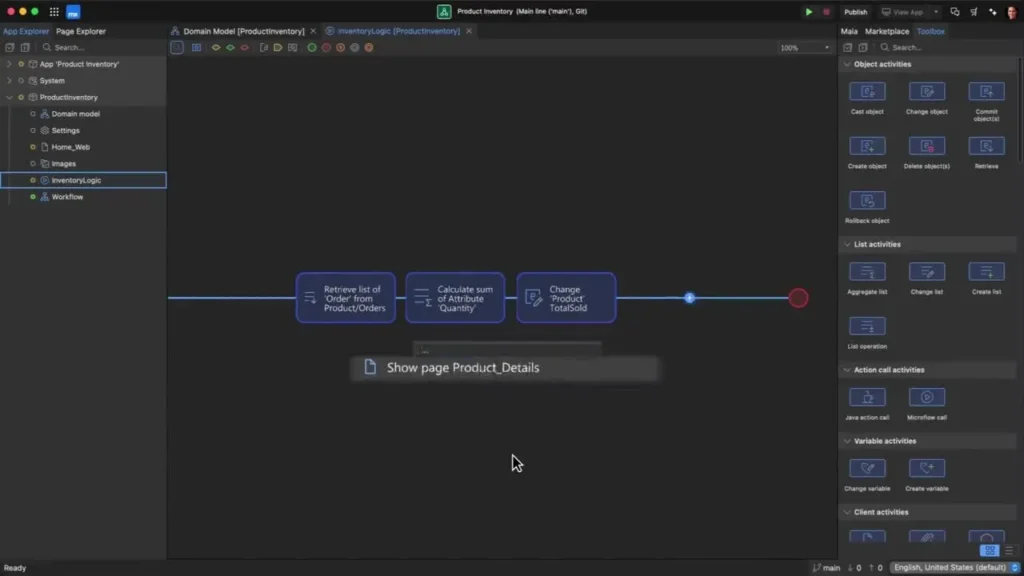
Mendix is a model-driven low-code platform designed for rapid, collaborative development of web and mobile applications.
This LCAP targets organizations that require visual domain modeling, multi-experience delivery, and SDLC support to run apps at scale.
Key features:
- Model-driven development (Mendix Studio / Studio Pro): Visual domain and process modeling that generates maintainable application artifacts and reduces hand-coding.
- Multi-experience delivery: Build web, mobile, and PWA experiences from shared models to support diverse user touchpoints.
- Cloud-native deployment & runtime: Support for deployments, cloud portability, and recent capabilities like zero-downtime deployments for enterprise operations.
- Governance & lifecycle tooling: Integrated versioning, environment promotion, testing automation, and expert services to help scale enterprise adoption.
Read More: Visual Programming: A Faster Way to Build Enterprise Apps6. QuickBase
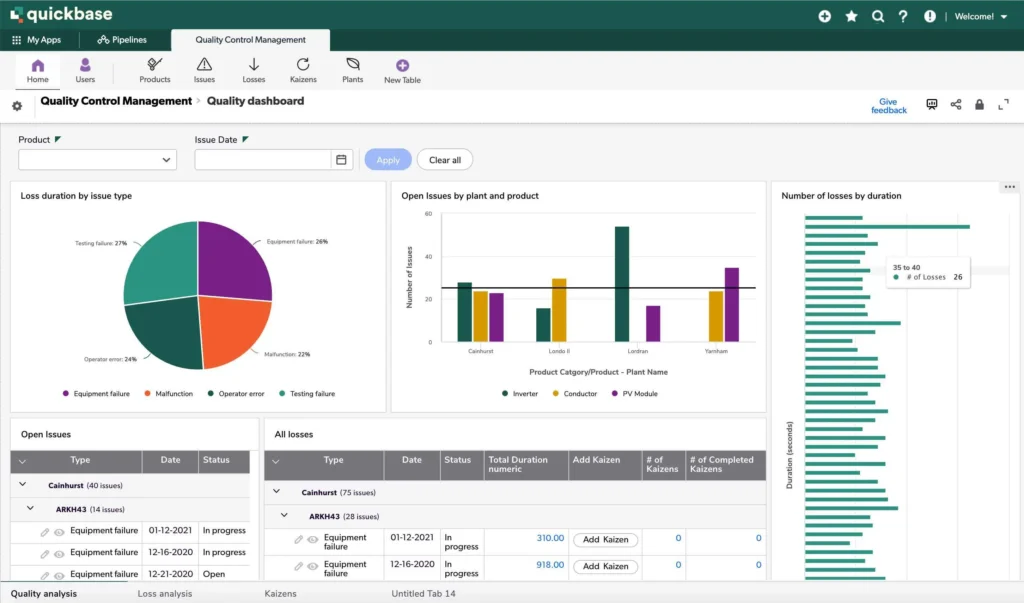
Quickbase is a no-code/low-code platform focused on empowering business teams to build, iterate, and run operational applications without heavy developer dependence.
This platform emphasizes a strong citizen-developer experience, a powerful underlying data engine, and centralized governance for distributed app creation.
Key features:
- Citizen developer experience: User-friendly visual builders and configurable forms designed so non-technical users can assemble apps and workflows quickly.
- Robust data engine: A platform database that supports relational and analytical patterns to power both transactions and reporting within apps.
- Template library & marketplace: Prebuilt templates and app patterns that accelerate common use cases (project management, approvals, ERP extensions).
- Admin controls & governance: Centralized admin console, role/permission management, and audit capabilities to keep citizen development safe at scale.
7. Retool
Retool is a developer-friendly platform optimized for building internal tools and admin UIs by wiring UI components directly to data sources and APIs.
This low-code development platform is favored by engineering teams that want rapid prototyping, pro-code extensibility, and strong connectivity to databases, APIs, and modern stacks.
Key features:
- Component-based UI builder: Drag-and-drop UI components (tables, forms, charts) for fast assembly of admin panels and dashboards.
- Rich data & API connectors: Native connectors to databases, REST APIs, and cloud services so tools can query and write data across systems with minimal plumbing.
- Pro-code extensibility & AI: Embed JavaScript/custom components for bespoke logic and leverage AI-assisted app generation or copilots for faster builds.
- Controls & deployment: Built-in SSO/RBAC, audit logs, and environment promotion to support secure rollouts in production.
8. Joget
Joget is an open-source cloud low-code/no-code platform that combines application development with business process automation to accelerate enterprise digital transformation.
This app development platform emphasizes visual app building, process orchestration, and an extensible plugin ecosystem so both business and technical teams can collaborate on production apps.
Key features:
- Visual app & form builder: Rapidly create data-driven apps and responsive forms with a web-based visual designer to shorten prototyping and delivery cycles.
- Process & workflow automation: Built-in BPM/workflow engine to design multi-step approvals, task routing, and automation tied to application data.
- Extensible plugin architecture & marketplace: Prebuilt plugins and a marketplace let teams add connectors or embed Joget components into third-party systems.
- Cloud-native deployment & governance: Options for cloud or on-premises deployment with tools for app governance, monitoring, and better scaling.
9. Uniface
Uniface is a model-driven low-code development and deployment platform focused on building data-intensive, mission-critical enterprise applications across heterogeneous runtime environments.
This low-code app developer targets organizations that need a proven, highly portable runtime, strong database and connectivity support, and tools for modernizing legacy systems without a full rewrite.
Key features:
- Model-driven development: Capture data structures, business rules, and UI behavior in a reusable application model to speed development and enforce consistency.
- Cross-platform runtime & broad connectivity: A mature runtime and connectors that support deployment across cloud, on-prem, and legacy systems (many DBMS and middleware integrations).
- Pro-code extensibility & migration support: Scripting and extension mechanisms let experienced developers implement complex logic and migrate existing Uniface applications to modern targets.
Low-Code Application Platform Selection Checklist for Enterprise
Selecting the right enterprise low-code platform is not just a technical decision. It’s a strategic investment that directly impacts your company’s ability to scale, adapt, and deliver digital initiatives efficiently.
To help you choose the right platform, these are several components that you can consider:
1. Governance and Security
- Verify role-based access controls (RBAC), audit logs, and compliance certifications (e.g., ISO 27001) to protect sensitive data across distributed teams.
- Confirm multi-tenant architecture with environment isolation for dev/test/prod to prevent disruptions in large-scale deployments.
2. Scalability and Performance
- Assess runtime capabilities for handling high-volume transactions, user concurrency, and auto-scaling in cloud or hybrid environments.
- Test load handling for 1,000+ concurrent users and support for microservices or distributed data sources.
3. Integration and Extensibility
- Evaluate prebuilt connectors for ERP/CRM systems (e.g., Mekari’s Ecosystem, SAP, Salesforce) plus custom API/SDK support beyond basic REST endpoints.
- Confirm support for event-driven architectures and real-time data syncing to handle dynamic enterprise workflows.
- Validate hybrid integration options for on-premises legacy systems alongside cloud services to minimize data silos.
4. Vendor and Supporting Ecosystem
- Review SLAs for uptime (99.9%+), dedicated enterprise support, and training resources for citizen developers.
- Analyze marketplace for reusable templates/plugins and community strength for faster onboarding.
5. Cost and ROI Metrics
- Calculate Total Cost of Ownership (TCO) including licensing, per-user fees, and hidden integration expenses; prioritize platforms with the most transparent pricing.
- Demand proof of ROI via case studies showing 50-70% faster development or cost reductions, aligned with enterprise use cases.
The Best Low-Code Application Development Platform for Enterprise
An ideal enterprise low-code platform should combine rapid development capabilities with strong integration, governance, and scalability to support complex enterprise operations.
Among the many enterprise low-code platforms available today, Mekari Officeless Studio stands out as a strong choice for enterprises to streamline software development processes without sacrificing scalability or governance.
By enabling visual development, workflow automation, and seamless system integrations in one platform, Mekari Officeless helps enterprises accelerate application development by up to 70% compared to traditional software development cycles.
Designed for both citizen developers and professional engineers, this enterprise development platform allows organizations to rapidly digitize internal processes while maintaining enterprise-grade reliability and control.
Key benefits of using Mekari Officeless Studio include:
- Accelerated app development: Applications can be built in weeks or even days using drag-and-drop tools, eliminating the need to code every component from scratch and significantly reducing development timelines.
- Reduced IT workload: Business teams and citizen developers can build simple internal apps independently, allowing IT teams to focus on complex integrations, security governance, and strategic technology initiatives.
- Seamless integrations: Built-in workflows and prebuilt connectors make it easier to integrate applications with existing enterprise systems, reducing manual configuration and development effort. Mekari Officeless Studio is also part of Mekari’s Unified Software Ecosystem, so it’s more acccessible if you need to customize off-the-shelf software.
- Centralized and transparent data: Auto-generated databases and structured application pages help centralize operational data, making it easier for teams to access consistent and reliable information.
- Flexibility and scalability: Applications can be updated, expanded, or customized quickly as business needs evolve, without creating development bottlenecks or requiring complete system rebuilds.
Ready to accelerate your enterprise app development process? Explore what you can build with Mekari Officeless Studio today.
References
Gartner. “Enterprise Low-Code Application Platforms Reviews and Ratings”
AppSmith. “Top 10 Low-code Platforms for Your App Development”

