


Mekari Insight
- SOP documentation is not just about writing procedures, but building a system that keeps them accurate, accessible, and consistently used across teams. Without proper management, SOPs quickly become outdated, fragmented, and ignored, leading to inefficiencies and rework
- A strong SOP system requires structured components such as metadata, version control, approval workflows, and clear ownership. SOP documentation directly impacts operational consistency, onboarding speed, compliance readiness, and business continuity
- To scale effectively, organizations need a centralized system that ensures SOPs remain governed, traceable, and continuously updated
- Mekari Officeless, part of the Mekari unified software ecosystem, offers a Document Management System. It provides a ready-to-use solution that centralizes SOPs, enforces document control, and automates workflows from creation to approval.
Most companies know they need SOPs, but few manage them well. Documents get created, then forgotten. Processes evolve, but SOPs stay the same. Over time, teams stop relying on them altogether. The real challenge is building a system that keeps them accurate, accessible, and actually used.
This guide focuses on closing that gap. You will learn what SOP documentation is, why it matters, its key components, lifecycle, best practices, how to organize an SOP library, and the tools that support it.
What is SOP documentation?
SOP documentation refers to the structured system behind how Standard Operating Procedures are created, formatted, stored, governed, and continuously maintained across their lifecycle. It is important to distinguish between the two:
- SOP: The document that outlines what needs to be done
- SOP documentation: The framework that ensures those documents stay accurate, version-controlled, accessible, and aligned with actual business operations
Many organizations write SOPs but fail to manage them properly. Over time, documents become fragmented, outdated, and difficult to trust.
This is why SOP documentation is not just administrative overhead. It is a governance layer. Without it, even well-written SOPs degrade quickly as processes evolve.
With the right system in place, companies can maintain consistency at scale, enforce version control, and ensure teams always rely on the most current procedures.
Read more: What Is a File Management System and Why Your Business Needs OneWhy SOP documentation matters
Without a structured approach to SOP documentation, even well-defined processes tend to break down over time. Teams begin to rely on assumptions, knowledge becomes siloed, and execution varies across individuals and departments.
1. Operational consistency
SOP documentation ensures that the same processes are followed across teams, regardless of location, tenure, or function. This reduces variability, minimizes errors, and maintains consistent output quality.
The impact of poor documentation is significant. Around 46% of employees report spending time each week redoing work due to unclear processes (Asana Anatomy of Work Global Index), and the annual cost per employee for searching information and recreating undocumented work can reach $12,506 (IDC Knowledge Worker Survey via Hyring).
2. Faster onboarding
Structured SOP documentation enables new hires to understand workflows quickly without relying heavily on colleagues. Instead of informal knowledge transfer, employees can refer to standardized procedures that reflect actual operations.
Organizations with formal onboarding SOPs can reduce new-hire ramp time by up to 50%, helping teams become productive faster while reducing dependency on senior staff.
3. Audit and compliance readiness
In regulated industries such as healthcare, manufacturing, finance, and food, SOP documentation is essential for compliance. Organizations must demonstrate that processes are clearly defined, approved, and consistently followed.
SOP documentation provides this through version control, approval records, and traceable updates. Companies with mature SOP programs report higher audit pass rates, showing that proper documentation plays a direct role in reducing compliance risk.
4. Business continuity
SOP documentation preserves institutional knowledge by capturing critical processes in a structured and accessible format.
When key employees leave or roles change, operations can continue without disruption because knowledge is not tied to individuals. This reduces operational risk and ensures long-term stability.
5. Continuous improvement
SOPs provide a clear baseline for evaluating and improving processes. Without documentation, it is difficult to identify inefficiencies or measure performance accurately. With SOP documentation in place, organizations can analyze workflows, refine processes, and implement improvements in a consistent and controlled manner.
6. Accountability and governance
SOP documentation introduces structure and ownership into process management. It records who created, reviewed, and approved each procedure, along with when it was last updated. This ensures processes remain aligned with company policies and evolving business needs.
More than 60% of employees say poor documentation hinders their daily productivity, while companies with effective SOPs report up to 25% lower employee turnover (Nintex via Whale). This highlights how strong documentation not only improves control but also supports a better working environment.
Read more: Top 11 Legal Document Management System to Save 12 Hours/WeekKey components of SOP management documentation
Effective SOP documentation is not just about writing clear procedures, but about structuring each document so it is controlled, traceable, and usable across teams.
Each component plays a specific role in ensuring the SOP remains clear, compliant, and easy to maintain throughout its lifecycle.
1. Document header and metadata
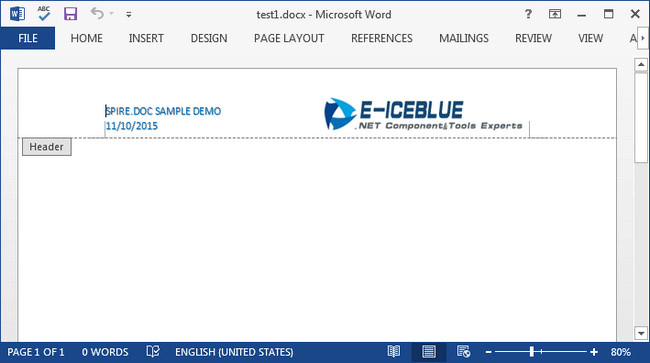
Every SOP should begin with a structured header that clearly identifies the document. This typically includes the document title, a unique ID or code, the department or process owner, version number, effective date, last review date, and approval signatures.
This metadata ensures traceability, prevents duplication, and makes it easier to manage documents at scale.
2. Purpose or objective
The purpose section explains why the SOP exists and what it aims to achieve, usually in one or two concise sentences. This helps employees understand the intent behind the process, not just the steps themselves, which is critical for proper execution and decision-making.
3. Scope
The scope defines who the SOP applies to and which processes or situations it covers. Just as important, it should clarify what is not included. If the scope leaves room for interpretation, it increases the risk of inconsistent application, so clarity here is essential.
4. Definitions and abbreviations
This section clarifies technical terms, acronyms, and jargon used within the SOP. It is particularly important for cross-functional processes and helps ensure that all users, including auditors or regulators, interpret the document consistently.
5. Roles and responsibilities
Clearly defining roles ensures accountability. This section should specify who performs each step, who oversees the process, and who has authority to approve or deviate from the procedure, including under what conditions.
6. Step-by-step procedure
This is the core of the SOP. Procedures should be written in active voice, structured in numbered steps, and presented in a logical sequence. Where necessary, include decision points such as if or then conditions, along with visual aids like screenshots or flowcharts to improve clarity. The goal is to make the process easy to follow without ambiguity.
7. Related documents and references
SOPs rarely exist in isolation. This section links to supporting forms, related SOPs, policies, or regulatory documents required to execute the process effectively. Providing these references ensures completeness and reduces the need to search for additional information.
8. Revision history
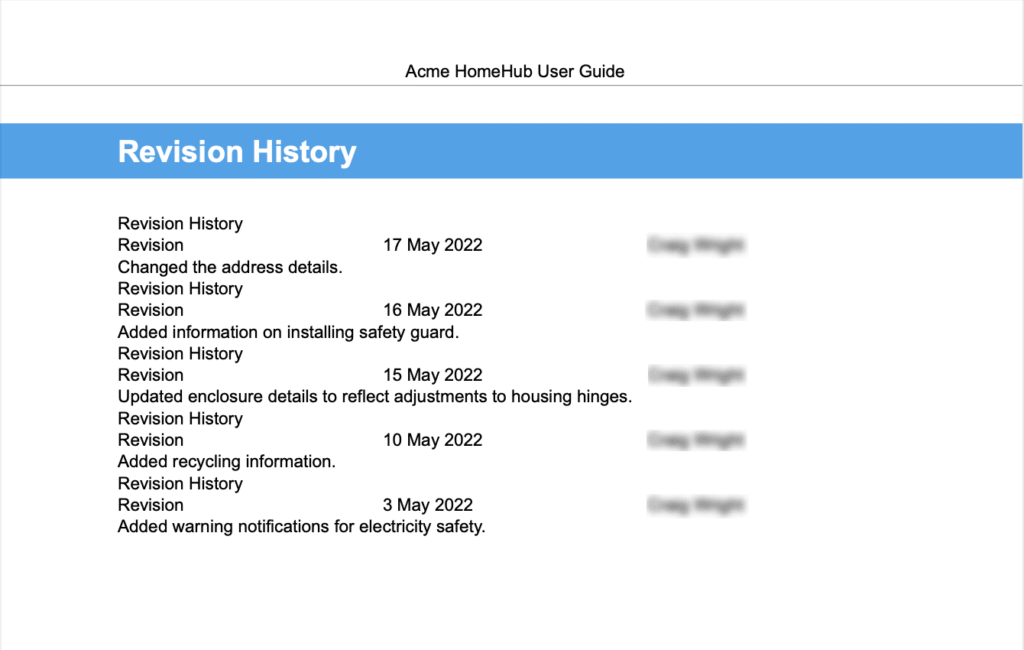
A revision history log records all changes made to the SOP, including what was updated, why the change was made, when it occurred, and who made it. This is essential for version control, audit readiness, and maintaining a clear record of how the process has evolved. For more on managing updates and version control, see.
9. Review and approval record
This section documents who reviewed and approved the SOP, along with dated signatures, whether digital or physical. It formalizes accountability and ensures that every procedure has been validated before being implemented, which is especially critical in regulated environments.
Read more: 10 Best Document Control Software: Simplify Documents, Approvals, and AuditsSOP documentation best practices
Without the right practices in place, SOPs quickly become outdated, ignored, or fragmented across teams. The following best practices help organizations turn SOP documentation into a reliable operational backbone.
1. Standardize your SOP template
A standardized SOP template is the foundation of scalable documentation. Without it, each document may follow a different structure, making SOPs harder to read, compare, and maintain.
A strong template ensures:
- All SOPs include required sections such as purpose, scope, roles, and procedures
- Consistency across departments and authors
- Faster creation and review cycles
Standardization also reduces cognitive load for employees. When every SOP follows the same format, users know exactly where to find the information they need.
2. Use clear and action-based language
SOPs should be written for execution, not interpretation. This means using active voice and direct, action-oriented language that leaves no room for ambiguity.
For example:
- Use “Submit the report by 5 PM” instead of “The report should be submitted”
- Avoid vague phrases like “as needed” or “if necessary” unless clearly defined
Clear language improves usability, reduces errors, and ensures that even new employees can follow procedures without additional clarification.
3. Keep SOPs granular and focused
Each SOP should document a single process or subprocess. When multiple workflows are combined into one document, it becomes harder to follow, maintain, and update.
Granular SOPs allow organizations to:
- Update specific processes without affecting unrelated ones
- Assign clearer ownership per SOP
- Improve usability for employees who only need part of a workflow
This modular approach also supports scalability as the organization grows and processes become more complex.
4. Establish a centralized SOP management system
Managing SOPs through scattered files or shared drives leads to version confusion and limited visibility. A centralized system, typically a Document Management System (DMS), is essential to maintain control.
A proper system should enable:
- A single source of truth for all SOPs
- Controlled access for editing versus viewing
- Structured storage with categorization and tagging
- Easy retrieval through search functionality
This ensures that employees always access the correct and most up-to-date SOP.
5. Implement strong version control and archiving
Version control is critical to maintaining trust in SOP documentation. Every change must be tracked transparently, including what changed, why it changed, and who approved it.
Best practices include:
- Assigning version numbers for every update
- Maintaining a revision history log
- Archiving previous versions instead of overwriting them
Archiving ensures that historical records are preserved for audits and compliance purposes, while preventing outdated versions from being used in daily operations.
6. Define clear ownership and accountability
Each SOP must have a designated owner who is responsible for maintaining its accuracy and relevance. Without clear ownership, SOPs often become outdated because no one is accountable for updating them.
Ownership responsibilities typically include:
- Reviewing the SOP on a scheduled basis
- Updating content when processes change
- Coordinating reviews with stakeholders
This creates accountability and ensures that SOPs evolve alongside the business.
7. Make SOPs easy to find and access
Even well-written SOPs are useless if employees cannot find them. As organizations scale, discoverability becomes a critical factor.
To ensure accessibility:
- Use consistent naming conventions
- Organize SOPs into logical categories
- Apply tags or metadata for easier search
A strong search function within your system is essential so employees can quickly locate the correct document without relying on others.
8. Maintain regular review and update cycles

SOPs should never be treated as static documents. Regular reviews are necessary to ensure they remain accurate and aligned with current operations.
A strong review process includes:
- Scheduled reviews (annual or biannual)
- Trigger-based reviews when processes, systems, or regulations change
- Involvement of subject matter experts and compliance teams
This prevents SOPs from becoming outdated and ensures they continue to reflect how work is actually performed.
9. Communicate changes and track acknowledgment
Updating an SOP is only effective if employees are aware of the changes and understand them. Organizations must actively communicate updates and ensure adoption.
This includes:
- Sending notifications when SOPs are updated
- Providing training for significant changes
- Requiring acknowledgment for critical or compliance-related SOPs
Tracking acknowledgment ensures that employees are not only informed but also accountable for following the latest procedures.
10. Enable continuous improvement and monitor effectiveness
SOP documentation should evolve based on real-world usage and performance data. Organizations should treat SOPs as dynamic assets that improve over time.
This involves:
- Collecting feedback from employees who use SOPs daily
- Identifying inefficiencies or unclear steps
- Applying continuous improvement methods to refine processes
Additionally, organizations should track key metrics such as compliance rates, error rates, and process efficiency. Regular audits and monitoring help ensure SOPs are being followed and remain effective.
Read more: Top 12 Cloud Based Document Management System for EnterpriseFrom scattered SOPs to a system that actually works
A reliable SOP library requires more than just documents. It needs standardized templates, clear ownership, version control, approval workflows, and a centralized system to keep everything consistent and up to date. Without this structure, SOPs quickly become outdated, duplicated, and difficult to trust, especially as the organization grows.
Mekari Officeless, part of Mekari unified software ecosystem, provides a Document Management System that helps. As a prebuilt solution, it enables businesses to centralize and govern SOP documentation without building a system from scratch.
With Mekari Officeless, organizations can benefit from:
- Centralized knowledge base
A single digital library where employees can easily find approved SOPs, policies, and documentation through search and structured categories - Document database and templates
Create, store, and manage documents in one place while maintaining consistency with standardized templates - Automated document approvals
Structured workflows for new documents, revisions, and periodic reviews to ensure every SOP is validated and tracked - Standardization and document control
Built-in document types and automatic numbering to enforce consistency, improve traceability, and support audits - Secure role-based access control
Ensure sensitive documents are only accessible to authorized personnel based on roles and permissions - Administrative configuration and governance
Centralized control over document categories, approval rules, folder structures, and overall documentation governance
By covering every layer of SOP documentation, from version control and approval workflows to access management and audit trails, Mekari Officeless provides a centralized, structured, and fully governed document repository that is ready to use from day one.
References
Hyring. ‘’What Is Standard Operating Procedure (SOP)?’’
The FDA Group. ‘’A Basic Guide to Writing Effective Standard Operating Procedures (SOPs)’’
