



Mekari Insight
- The more SaaS applications a business uses, the greater the need to integrate them so workflows remain aligned and efficient.
- Choose an integration method based on your scale and needs. From native integration, iPaaS, to APIs and webhooks each plays a different role depending on complexity and available resources.
- Use Mekari Officeless for faster and more flexible integrations. With integration capabilities across external applications and within the Mekari ecosystem, Mekari Officeless provides secure, scalable, and time-efficient custom workflow solutions.
As the number of applications used in business operations continues to grow, many companies face a new challenge: how to connect all systems so workflows remain smooth and efficient.
Businesses need to understand how to integrate SaaS effectively so that all systems are connected and work in harmony. This article discusses various methods for integrating SaaS into your business processes, along with examples of how they are applied in daily workflows.
What is SaaS integration?
SaaS integration is the process of connecting various cloud applications (SaaS) used within a company so they can exchange data and operate automatically. Since each application serves a different function, companies need to integrate SaaS solutions to create efficient and connected workflows.
For example, you can integrate a SaaS CRM with a machine learning system so that new customer data is processed automatically. Or you can connect accounting software with an HR system to accelerate reimbursement and payroll processes.
With the right integration, companies can build cross-team workflows that are efficient, responsive, and minimize human error.
Benefits and importance of SaaS integration for businesses
The more SaaS applications a business uses, the greater the need to connect them into a unified workflow.
Here are the main benefits of SaaS integration for business operations:
- More streamlined workflows: Data between applications is automatically connected, allowing processes to run without switching systems or manually copying and pasting data.
- Improved team productivity: When all information is available in a single dashboard, teams can work faster and stay focused without dealing with scattered data across multiple platforms.
- Easier data-driven decision-making: With real-time access to data from multiple systems, management can immediately gain insights without waiting for manually compiled reports.
- Reduced risk of errors: When data transfers automatically and consistently, the risk of input mistakes or duplication is significantly reduced.
- Better visibility of the big picture: Integration connects different business functions, helping organizations understand patterns, trends, and relationships between processes.
- Automated business processes: For example, when inventory runs out, it can automatically trigger a purchase request, or a leave request can automatically connect to the payroll system, within a single workflow without manual intervention.
- Lower development costs: Businesses do not need to build systems from scratch. They can simply use available applications and integrate them according to their needs, saving both time and effort.
- Faster service expansion: When systems are already integrated, adding new features or expanding services becomes easier without rebuilding the platform.
Examples of SaaS integration in company workflows
SaaS integration directly impacts daily operational efficiency. Here are several examples of how integrating SaaS helps unify workflows across departments:
- Marketing → Sales: Prospect data from marketing automation platforms is automatically stored in the CRM. Sales teams always receive updated information, from lead scores to the latest customer activity.
- E‑commerce → ERP: When a new order is placed in an online store, the details are automatically sent to the ERP system, including inventory updates and warehouse management.
- HR → Payroll & Benefit: When employee data changes—such as promotions or annual leave—the HR system automatically updates the payroll system. Salaries, benefits, and deductions are calculated based on the latest status.
- Expense/Travel → Accounting: Travel expenses or employee reimbursements are automatically recorded in accounting journals, including account categories and cost centers.
- ERP ↔ TMS/Shipping: The ERP system connects with a Transportation Management System (TMS) to calculate shipping costs, select the best courier, and display delivery status and estimated arrival time (ETA) in the customer portal.
- Helpdesk/Ticketing ↔ CRM: When the support team opens a ticket, they can immediately see contract details, SLA information, and customer health scores. Meanwhile, sales teams can also monitor churn signals and customer feedback from the helpdesk system.
- Vendor Portal ↔ Accounting: Vendor data, partnership contracts, and shipment statuses are interconnected. Finance teams also receive automatic notifications when deliveries are delayed or invoices reach their due dates.
Baca Juga: Custom SaaS Development: Guide for Business OwnerSaaS integration methods
Every company has different integration needs depending on its scale, system complexity, and available technical resources.
Here are several common methods for integrating SaaS into business processes:
1. Integrasi native
This method creates a direct connection between internal systems and SaaS applications. It is suitable for companies that require high flexibility and highly customized workflows.
However, development time and implementation costs are typically higher and require a strong technical team.
2. iPaaS (Integration Platform as a Service)
iPaaS is a third-party platform that provides ready-to-use connectors to link various SaaS applications.
This method is ideal for companies that want fast integration without building everything from scratch. While relatively easy to use, some cases still require technical team involvement for further customization.
3. RPA (Robotic Process Automation)
RPA uses bots to copy data from one application to another through the user interface, making it suitable for applications that do not provide APIs.
RPA can be very helpful for short-term automation. However, if the application interface or UI elements change, the bot may fail to perform its tasks. Therefore, this approach requires regular maintenance and monitoring.
4. Integrasi kustom via API
Using APIs to connect applications directly is the most flexible method. Businesses can customize data flows according to their needs, whether in the cloud or on-premise.
This method is typically used alongside SaaS workflow management tools and requires developers as well as proper technical documentation.
5. Webhook
Webhooks work like real-time notifications. When a certain event occurs, for example, when a form is submitted, application A can immediately send data to application B without manual requests.
This method is ideal for integrations that require quick and efficient responses, such as customer data synchronization, notifications, or instant approvals.
6. Middleware
Middleware is intermediary software that manages data exchange and integration logic between applications.
This solution is particularly useful for large-scale integrations involving multiple systems, especially during migrations from legacy systems to a new SaaS ecosystem.
Considerations when choosing a SaaS integration method
Selecting the right SaaS integration approach is not only a technical decision but also involves efficiency, scalability, and alignment with business needs. Here are several key factors to consider:
1. Alignment with business needs and processes
First, review how your business processes operate. Are the workflows standard or complex? Integration should support business objectives, not merely connect applications.
2. Compatibility with existing systems
Ensure the applications to be integrated can work with your existing internal systems, whether cloud-based or on-premise. Also check API availability, documentation, and vendor support.
3. Team capacity and technical resources
Consider whether your organization has an internal technical team capable of handling custom integrations or if a ready-to-use solution such as iPaaS would be more suitable.
4. Scale, flexibility, and long-term plans
If you plan to integrate more systems or increase data volume in the future, ensure the chosen approach can scale without requiring complete redevelopment.
5. Implementation cost and efficiency
Calculate not only the initial costs but also maintenance, licensing, and technical support expenses. A simple solution at the start may become costly in the long run if it does not match your scale and needs.
6. Security and data compliance
If the integration involves sensitive data or transfers across platforms, ensure the chosen approach complies with applicable data protection regulations.
The best SaaS workflow integration platform in Indonesia
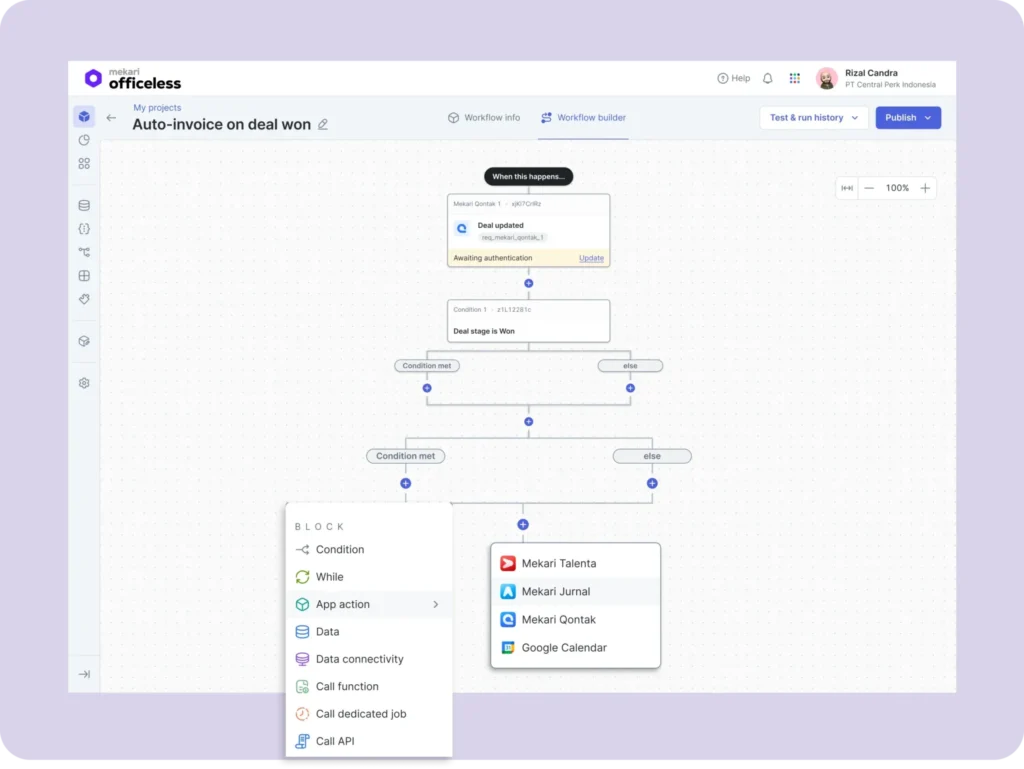
Integrating multiple SaaS applications, whether across external platforms or within a single ecosystem, requires a flexible and reliable solution. Mekari Officeless serves as one of the best custom workflow platforms to address this challenge.
As an integration platform, Mekari Officeless offers several advantages that make it an ideal choice for companies in Indonesia:
- An independent and instant solution for handling complex business processes
- More cost-efficient with a single multifunctional platform
- Efficient and secure big data processing and storage
- Integration projects completed up to 5× faster, significantly reducing IT team workload
- Seamless integration with legacy systems such as SAP, Oracle, and Salesforce
- Easy local integration with popular platforms such as WhatsApp, Traveloka, and Artajasa
- Enterprise-ready features with high security standards
- Compatible with various platforms, from websites to native mobile applications
- Flexible deployment options, either on-premise or via private cloud
Mekari Officeless addresses SaaS integration needs in Indonesia in a more practical, faster, and business-relevant way.
References
Amazon. ”What is SaaS integration?”
Digiteum. ”How SaaS Integration Improves Your Business Process”
