


Mekari Insight
- Law firms lose up to 6 hours per week on document management, making inefficiency a major hidden cost in legal operations
- Legal document management systems help centralize files, automate workflows, and improve document accessibility across teams. Strong security, audit trails, and compliance features are essential to protect sensitive client data and meet regulatory requirements
- To fully eliminate manual bottlenecks and ensure compliance at scale, firms need a structured and customizable DMS. Mekari Officeless, part of Mekari unified software ecosystem, offers Document Management System that helps streamline approvals, maintain compliance, and support long-term scalability.
Law firms handle sensitive documents under tight deadlines and strict compliance. However, many still rely on shared drives, email, or basic cloud storage that lack proper structure and security.
This leads to inefficiencies. According to IDC, lawyers lose up to 6 hours per week on document management, costing around $9,071 per lawyer annually. They also spend 2.3 hours searching for documents and another 2 hours recreating lost files.
Adoption of legal tech is rising. The 2024 ABA Legal Technology Survey Report shows 73% of law firms already use cloud-based tools, especially for document management. In this guide, we’ll cover what legal DMS is, why it matters, its key features, top software options, and how to implement it effectively.
What is a legal document management system?
A legal document management system (DMS) is a software designed to help law firms and legal teams store, organize, retrieve, and securely share documents in one centralized system.
Instead of scattered files across emails or folders, everything is managed in a structured and searchable repository.
Unlike generic cloud storage like Google Drive or Dropbox, a legal DMS is built specifically for legal workflows and requirements, such as:
- Matter-centric organization: Documents are organized by client, case, or matter, making it easier to track everything related to a specific legal workstream
- Version control and audit trails: Every change is recorded, so teams can track edits, access history, and document activity with full transparency
- Role-based access permissions: Access can be controlled at a granular level, ensuring only authorized users can view, edit, or share sensitive documents
- Compliance and security features: Includes encryption, ethical walls, and support for standards like GDPR, HIPAA, SOC 2, and ABA guidelines
In practice, a legal DMS acts as foundational infrastructure that transforms document handling from a manual and fragmented process into a more structured, secure, and efficient system.
Read more: What Is a File Management System and Why Your Business Needs OneWhy law firms need document management systems
Law firms deal with high volumes of sensitive documents, yet many still rely on manual or fragmented systems that slow down work, increase costs, and expose the firm to security risks. A legal document management system helps address these challenges by improving efficiency, reducing operational costs, and ensuring compliance.
1. Time savings and productivity recovery
According to an IDC study, lawyers and legal professionals lose up to 6 hours per week dealing with document management challenges, with at least 2.3 hours spent searching for documents and another 2 hours recreating lost files.
This inefficiency costs law firms approximately $9,071 per lawyer annually, representing a 9.8% loss in total productivity.
In contrast, law firms using an integrated platform report saving 8 to 12 hours per week by eliminating double data entry and automating administrative processes (Legal Prod).
2. Cost reduction and ROI
The financial impact of adopting a DMS is equally significant. Over 60% of law firms using DMS report a 25% productivity improvement due to automation and better version control, with some firms reducing document management costs by up to 30% (NetDocuments).
Additionally, digital DMS adoption has helped some firms reduce printing and storage costs by over 80%, while also recovering billable hours previously lost to manual search tasks (Run Sensible). Cloud-based systems further reduce expenses by eliminating the need for server infrastructure and ongoing IT maintenance.
3. Growing market adoption
The adoption of legal technology continues to grow rapidly across the industry. The 2024 ABA Legal Technology Survey Report found that 73% of law firms now use cloud-based legal tools, with document management and practice management software leading adoption.
Another survey shows that 78% of legal professionals consider legal technology a must-have, marking a 15% increase since 2021 (Clinked).
This trend is reflected in the market as well, with the global legal document management software market projected to grow from USD 2.49 billion in 2024 to USD 9.67 billion by 2034, at a CAGR of 14.52%(Zion Market Research).
4. Security and compliance requirements
Security remains a major concern, especially as law firms handle highly confidential client data. The 2024 ABA survey reports that 60% of law firms have implemented formal cybersecurity policies, yet threats such as phishing and ransomware remain prevalent.
At the same time, about 90% of law firms have fewer than 20 attorneys (American Bar Association), which often limits their ability to invest in complex IT infrastructure.
This makes secure, cloud-based document management systems a practical and essential solution for maintaining compliance, protecting sensitive data, and managing risk effectively without heavy internal resources.
Read more: 10 Best Document Control Software: Simplify Documents, Approvals, and Audits11 best legal document management systems
Choosing the right legal document management system depends on your firm’s size, workflow complexity, and security requirements. Below is a curated list of leading platforms, grouped by use case to help you find the best fit.
1. Mekari Officeless
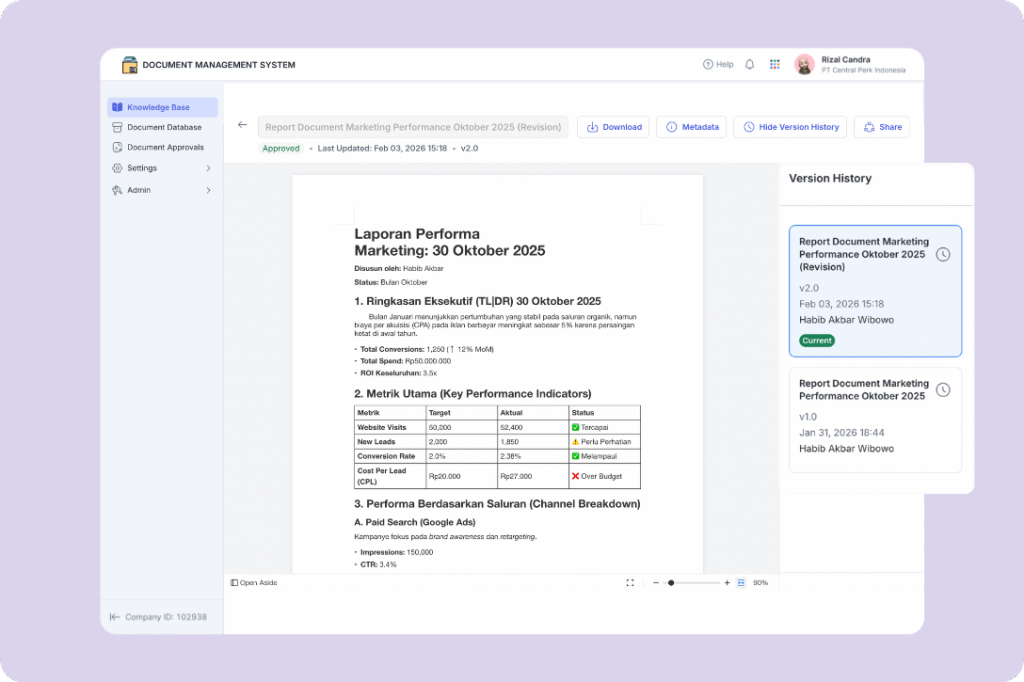
Mekari Officeless, part of Mekari unified software ecosystem, offers a document management system designed to help organizations, including law firms and legal departments, manage documents in a secure, centralized platform with transparent workflows and strong compliance controls.
Key features:
- Centralized knowledge base that allows teams to easily search and access approved policies, guidelines, and legal documents in one place
- Document database with standardized templates to ensure consistency and accuracy across legal documentation
- Automated approval workflows that manage document creation, revisions, and reviews in a structured and trackable process
- Built-in document control and numbering system to improve traceability and support audit and compliance requirements
- Role-based access control to ensure only authorized users can view or edit sensitive legal documents
- Comprehensive audit trail that records all activities, including approvals, changes, and user actions for full transparency
- Version control and lifecycle management that automatically track updates, replace outdated versions, and schedule periodic reviews
- Secure external sharing through password-protected links with expiration settings for safe collaboration with clients or auditors
Best for: Large firms and enterprises that need a structured, compliant, and customizable document management system to streamline legal workflows and reduce manual bottlenecks
Read more: Top 12 Cloud Based Document Management System for Enterprise2. NetDocuments
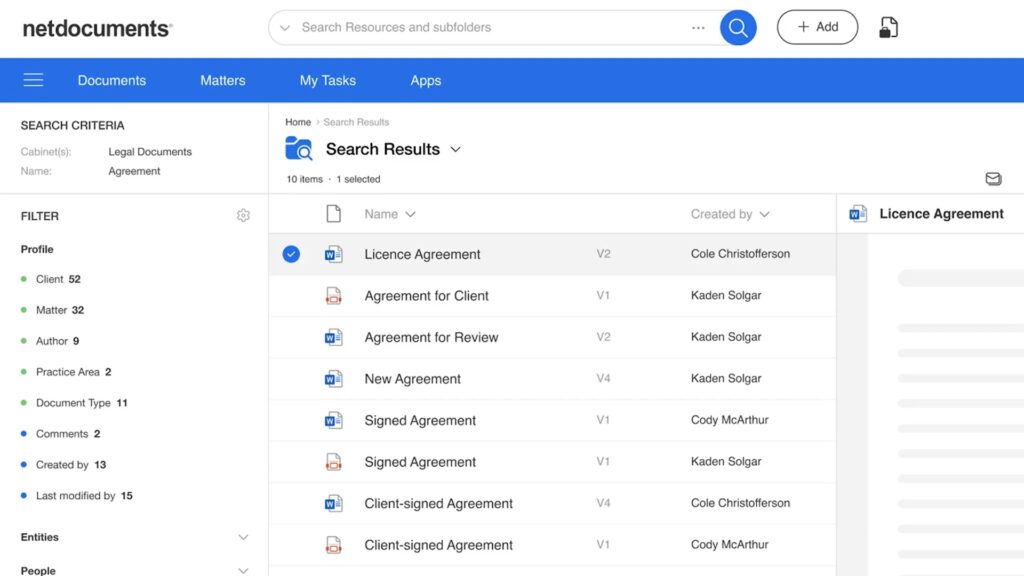
NetDocuments is a cloud-native legal DMS built for large law firms that prioritize security, compliance, and reliability.
Key features:
- Cloud-first architecture designed to meet strict compliance standards like GDPR, HIPAA, and FedRAMP
- Advanced document versioning and audit trails that track every interaction and change made to files
- Secure collaboration tools that allow teams to work on documents without compromising data integrity
- 150+ integrations with legal and business tools to streamline workflows across systems
- High availability infrastructure with 99.9% uptime to ensure consistent access to critical documents
Best for: Large firms prioritizing security and compliance
3. iManage
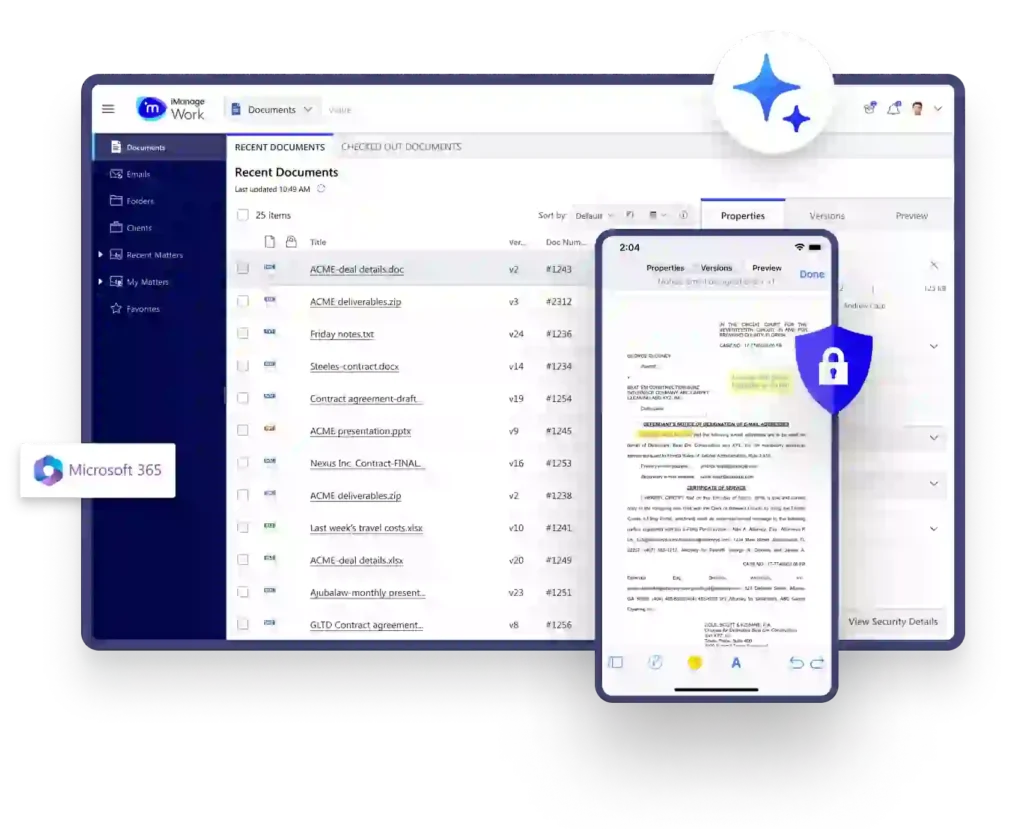
iManage is an enterprise-grade legal DMS widely used by top-tier law firms for managing documents and emails within a unified platform.
Key features:
- AI-powered document classification that automatically organizes files based on content and context
- Deep integration with Microsoft Office, enabling seamless document creation and editing within familiar tools
- Matter-centric structure that aligns documents with clients and cases for easier navigation
- Enterprise-level scalability that supports large teams and high document volumes
- Built-in security and governance features to meet strict legal and regulatory requirements
Best for: Am Law 100 firms and large legal teams needing scalable, AI-driven document management
4. LexWorkplace
LexWorkplace is a modern cloud-based legal DMS built specifically for mid-sized law firms looking for simplicity and reliability.
Key features:
- Matter-centric organization that keeps documents structured around cases and clients
- Cross-platform compatibility supporting both Windows and Mac environments for flexible team usage
- Built-in email management to store and organize communications alongside documents
- Predictable pricing model that helps firms manage costs without hidden fees
- User-friendly interface designed to minimize training and speed up adoption
Best for: Mid-size firms seeking a straightforward, legal-focused DMS
5. Worldox
Worldox is a flexible document management system offering both on-premise and cloud deployment options for firms needing customization.
Key features:
- Highly customizable document organization system that can be tailored to firm-specific workflows
- Integration capabilities with various legal and business tools to extend functionality
- Advanced search features that allow users to quickly locate documents across large repositories
- Option for on-premise deployment for firms requiring full control over their data
- Robust document profiling and indexing for better categorization and retrieval
Best for: Firms needing extensive customization and deployment flexibility
6. ProLaw
ProLaw is a legal management solution by Thomson Reuters that combines document management with broader practice management capabilities.
Key features:
- Seamless integration with Thomson Reuters products like Westlaw for enhanced legal research workflows
- Centralized system that combines document management with case and financial management
- Matter-based organization that aligns documents with legal cases and activities
- Built-in reporting tools to track performance and operational metrics
- Scalable platform suitable for growing firms within the Thomson Reuters ecosystem
Best for: Firms already using Thomson Reuters tools
7. Clio
Clio is a popular all-in-one legal practice management platform that includes document management as part of its core offering.
Key features:
- Integrated document management combined with case tracking, billing, and time tracking in one platform
- Cloud-based system that allows access to documents anytime and anywhere
- 250+ integrations with legal, accounting, and productivity tools
- Secure client collaboration features for document sharing and communication
- Intuitive interface designed for quick onboarding and ease of use
Best for: Firms seeking a unified system for managing both documents and legal operations
8. MyCase
MyCase is an affordable legal practice management software with built-in document management designed for smaller firms.
Key features:
- Simple document organization system that categorizes files based on cases and clients
- Built-in client communication tools that allow secure sharing of documents and updates
- Automated workflows that help reduce manual administrative tasks
- User-friendly dashboard that provides quick access to important documents and activities
- Cost-effective pricing suitable for firms with limited budgets
Best for: Budget-conscious small firms
9. Smokeball
Smokeball is a legal practice management platform focused on automation and productivity, including document management features.
Key features:
- Automatic document naming and filing that reduces manual input and human error
- Pre-built document templates that speed up document creation and standardization
- Activity tracking that automatically records work for better billing accuracy
- Strong integration with Microsoft Word and Outlook for seamless workflows
- Productivity-focused tools designed to save time on repetitive tasks
Best for: Small firms wanting automation and efficiency
10. Filevine
Filevine is a legal platform focused on litigation workflows, combining document management with case management.
Key features:
- Timeline-based document organization that aligns files with case progress and events
- Advanced automation tools that streamline repetitive legal processes
- Centralized case management system that connects documents, tasks, and communications
- Customizable workflows tailored to litigation processes
- Collaboration features that allow teams to work efficiently on active cases
Best for: Litigation-focused firms
11. Clinked
Clinked is a document management and collaboration platform with strong client portal capabilities.
Key features:
- Branded client portals that enable secure document sharing and collaboration with clients
- Real-time communication tools integrated with document workflows
- ISO 27001 certification ensuring high-level data security standards
- Transparent pricing with no hidden costs for easier budgeting
- Easy-to-use interface designed for both internal teams and external stakeholders
Best for: Firms prioritizing client collaboration and secure document sharing
Key benefits of legal document management systems
A legal document management system brings measurable impact across daily legal work, firm operations, compliance, and client experience.
1. For attorneys and legal staff
- Faster document retrieval: Full-text search allows lawyers to find contracts, motions, or notes in seconds without navigating complex folder structures
- Reduced administrative burden: Automated document profiling, version control, and template-based drafting reduce repetitive work and prevent errors like duplicate files or overwritten documents
- Remote accessibility: Cloud-based access enables legal teams to securely work from anywhere using any device, supporting hybrid and remote setups
- More billable hours: Less time spent on document management means more time can be allocated to client work and revenue-generating activities
2. For law firm operations
- Centralized knowledge repository: All documents are stored in one system, eliminating scattered files across emails, personal drives, and shared folders
- Scalability without added headcount: Firms can handle increasing workloads and document volumes without needing to expand their team
- Improved collaboration: Real-time editing, secure sharing, and client portals enable teams to collaborate without relying on unsecured email attachments
- Disaster recovery: Automatic backups and data redundancy ensure documents remain safe and recoverable in case of system failure or data loss
3. For compliance and risk management
- Complete audit trails: Every document access and change is tracked, creating transparent and defensible records for audits and compliance
- Regulatory compliance: Built-in support for standards like GDPR, HIPAA, SOC 2, and ABA guidelines helps firms meet legal requirements more easily
- Ethical wall enforcement: Role-based access controls prevent unauthorized access and reduce the risk of conflicts of interest
- Client data protection: Advanced security features such as encryption and multi-factor authentication protect sensitive legal information
4. For client service
- Secure client portals: Clients can review and approve documents through secure platforms, improving transparency and communication
- Faster turnaround: Streamlined workflows help legal teams respond more quickly and complete work more efficiently
- Professional standards: Consistent formatting and version control ensure documents are accurate, up-to-date, and professionally delivered
How Mekari Officeless can streamline your legal document management
Managing legal documents manually often leads to scattered files, inconsistent workflows, and higher compliance risks.
Mekari Officeless, part of Mekari unified software ecosystem, helps solve this by providing the best legal document management software where all files, approvals, and access controls are structured in one secure platform.
With features like centralized storage, automated approvals, role-based access, audit trails, and version control, legal teams can manage documents more efficiently while maintaining compliance and data security. This allows firms to reduce manual bottlenecks, improve collaboration, and ensure every document is accurate, traceable, and audit-ready.
Ready to eliminate document chaos and strengthen compliance? Explore how Mekari Officeless delivers best legal document management software for modern law firms or discover its broader integrated legal software solutions designed to support your end-to-end legal operations.
References
Clinked. ‘’10 Best Legal Document Management Systems in 2026 Reviewed’’
Metajure. ‘’Lawyers Waste As Much As Six Hours a Week on Document Management Issues’’
Run Sensible. ‘’11 Best Document Management software for Law Firms’’
Zion Market Research. ‘’Legal Document Management Software Market Size, Share, Trends, Growth and Forecast 2034’’
