




Mekari Insight
- Enterprise automation coordinates workflows across systems and departments at the organizational level — not just within a single team or tool.
- Building an enterprise automation strategy starts with mapping high-volume, error-prone processes, matching each to the right automation type, piloting before scaling, and establishing governance to measure and sustain results.
- Mekari unified software ecosystem combines operational automation, seamless integration, and intelligent reporting in one integrated SaaS platform to support enterprise automation at scale.
Automation initiatives often start with genuine promise — a workflow gets faster, a report gets automated — but the gains stay isolated, and the broader operational picture barely changes.
RAND Corporation’s 2024 research found that over 80% of automation projects fail at twice the rate of conventional IT projects, a pattern that points to execution gaps rather than technology limitations.
Enterprise automation addresses this by treating automation as a company-wide strategy rather than a departmental fix. It spans everything from rule-based task automation and business process orchestration to AI-powered decision workflows that adapt in real time.
Read on to understand how enterprise automation works, which types matter most, and how to build an approach that goes beyond isolated wins.
What Is Enterprise Automation?
Enterprise automation is the strategic use of technology to integrate and automate business processes across an organization. It’s not just within a single department or for a single task, but as a coordinated operational layer that connects people, systems, and workflows from end to end.
Actually, most organizations already use some form of automation: a scheduled report here, an auto-approval rule there. But these are basic task automation.
Enterprise automation is what happens when those isolated efforts are replaced by a unified approach where systems communicate, processes trigger each other, and data flows without manual intervention.
At its core, enterprise automation addresses three operational realities that basic task automation cannot:
- Fragmentation: When each department automates independently, data stays siloed and handoffs between teams remain manual, even if the work inside each team is automated.
- Scalability: Rule-based tools that work at low volume tend to break — or require constant maintenance — as the organization grows.
- Visibility: Isolated automation produces isolated data. Without a connected layer, leadership cannot see operational performance across functions in one place.
Enterprise automation resolves these by operating at the system level rather than the task level. The goal is not to replace individual manual steps, but to redesign how work moves through the organization.
| Aspect | Basic Task Automation | Enterprise Automation |
|---|---|---|
| Scope | Single task or department | Cross-departmental, end-to-end |
| Integration | Standalone | Connected across systems |
| Data flow | Siloed | Unified |
| Scalability | Limited | Built to scale |
| Visibility | Departmental | Organization-wide |
This is why enterprise automation is increasingly treated as an infrastructure decision rather than a software purchase, because it shapes how the entire organization operates, not just how one team works faster.
How Enterprise Automation Works
Enterprise automation operates through a layered architecture that connects three core components, which are the processes that need to run, the systems that hold the relevant data, and the logic that determines what happens when.
Understanding how these layers interact is what separates a well-designed automation strategy from a collection of disconnected tools.
The basic mechanism of enterprise automation follows a consistent pattern:
- Trigger: An event initiates the workflow — a form submission, a status change, a scheduled time, or a data threshold being met.
- Logic: The system evaluates conditions and determines the next action — route to approver, update a record, notify a team, or escalate based on predefined rules.
- Action: The output is executed across one or more systems — an email sent, a record updated, a document generated, a payment processed.
- Reporting: The outcome is logged and surfaced for monitoring, auditing, or further decision-making.
At the enterprise level, this pattern of automation does not run in isolation. It runs simultaneously across departments, systems, and geographies, which is where the architecture becomes important.
The three layers of enterprise automation architecture:
- Orchestration engine: Coordinates automated tasks across different systems and workflows, ensuring they execute in the right sequence and handle exceptions without breaking the chain.
- Automation pipelines: The individual workflows that carry data and actions between systems, for example from a CRM updating a customer record to a finance system triggering a payment run.
- AI and machine learning layer: Handles decisions that cannot be reduced to fixed rules such as classifying documents, predicting approval outcomes, flagging anomalies, or routing exceptions to the right person.
Read More: 10 Best Document Control Software: Simplify Documents, Approvals, and AuditsTo make this concrete, here is an example on how a single business process, employee onboarding, runs through this architecture:
| Stage | What Happens | Systems Involved |
|---|---|---|
| New hire confirmed in HRIS | Triggers onboarding workflow automatically | HRIS, workflow engine |
| IT provisioning | Accounts and access created without manual request | HRIS, IT provisioning tool |
| Payroll setup | Employee data synced, payroll record created | HRIS, payroll system |
| Equipment request | Request routed to procurement for approval | Procurement platform |
| Manager notification | Automated briefing sent with onboarding checklist | Email, task management |
| Compliance logging | All steps recorded for audit trail | Document management, compliance system |
Without enterprise automation, each of these steps requires a handoff — an email, a ticket, a manual data entry. With it, the entire sequence runs from a single trigger, with humans only stepping in where judgment is genuinely required.
Types of Enterprise Automation
As it said before, enterprise automation is not about a single technology. It is a spectrum, and organizations rarely use just one type.
Most automation on the enterprise level combines several, applying each where it fits based on process complexity, the systems involved, and how much judgment the workflow requires.
The five types below represent the enterprise automation spectrum from simplest to the most sophisticated one:
1. Basic Task Automation
Basic task automation handles repetitive, rule-based actions that follow a fixed pattern with no variation or decision-making involved. In enterprise, this can be handled by a workflow automation software.
If condition A is met, action B happens, consistently, every time. This kind of automation is the entry point for most automation programs and delivers quick wins with minimal technical complexity.
Common use cases:
- Scheduled report generation and distribution.
- Auto-populating fields when a form is submitted.
- Sending confirmation emails after a transaction is completed.
- Moving or renaming files based on predefined naming conventions.
2. Robotic Process Automation (RPA)
RPA uses software bots to mimic human actions within digital interfaces, clicking, copying, entering data, navigating between systems, without requiring those systems to be integrated at the API level.
It is particularly effective for automating high-volume, rule-based tasks that span multiple applications but cannot be connected through native integrations.
Where basic task automation operates within a single system, RPA works across systems by replicating what a human user would do manually.
Common use cases:
- Extracting data from supplier invoices and entering it into an ERP system.
- Pulling figures from multiple dashboards to compile a consolidated report.
- Processing employee data changes across HR, payroll, and IT systems simultaneously.
3. Business Process Automation (BPA)
BPA is a type of automation that covers multi-step workflows and spans more than one system or team.
Unlike basic task automation and RPA, which focus on executing individual actions, BPA manages entire sequences, from one action triggers the next, conditions branching the workflow in different directions, and approvals or exceptions are handled within the flow itself.
Common use cases:
- Procurement workflow from purchase request through approval, PO creation, and vendor notification.
- Employee leave requests routed through manager approval, HR logging, and payroll adjustment.
- Invoice processing from receipt through three-way matching, approval, and payment scheduling.
4. Integration Automation
Integration automation connects systems and data that would otherwise operate independently, using APIs and middleware to keep data synchronized across platforms in real time.
Its primary function is eliminating manual re-entry, so that when a record is created or updated in one system, relevant systems reflect that change automatically.
This is distinct from BPA in focus. BPA orchestrates workflow sequences, while integration automation ensures the underlying data stays consistent across the ecosystem.
Common use cases:
- CRM to ERP sync when a deal is closed or a customer record is updated.
- Headcount changes in an HRIS automatically reflected in payroll and IT provisioning.
- E-commerce order data flowing into a finance system without manual export and import.
Read More: Enterprise Data Integration: Methods & Solutions5. Intelligent Automation
Intelligent automation handles workflows where the decision cannot be reduced to a fixed rule. Powered by AI and machine learning, the system interprets context, learns from patterns, and makes or recommends decisions in real time.
This is the layer that extends automation into the edges of a process — where exceptions, ambiguity, and judgment have traditionally required human intervention.
It is also the type most likely to evolve. That is because intelligent automation systems improve over time as they process more data, making them progressively more accurate and capable of handling greater complexity.
Common use cases:
- Intelligent document processing: extracting and classifying data from unstructured invoices, contracts, or forms.
- Anomaly detection in expense reports or financial transactions.
- Predictive approval routing based on historical decision patterns.
- Natural language interfaces for querying operational data without manually writing reports.
How to Build an Enterprise Automation Strategy
Most enterprise automation initiatives fail not because the technology does not work, but because organizations skip the strategic groundwork.
Before selecting tools or launching pilots, it helps to understand where your organization sits on the automation maturity curve and what a realistic path forward looks like.
The four stages of automation maturity:
- Point solutions: Individual processes are automated in isolation, delivering quick wins but creating data silos and disconnected workflows across departments.
- Workflow integration: Automated processes begin to connect across teams and systems, reducing manual handoffs and improving end-to-end visibility.
- Intelligent orchestration: The system makes decisions based on data patterns, routing exceptions, predicting outcomes, and adapting workflows without human input at every step.
- Predictive automation: The organization’s automation layer anticipates operational needs proactively, flagging issues and triggering actions before problems materialize.
Most enterprises begin at stage one and build toward stage two and three over time. Understanding which stage you are at shapes which investments make sense next.
1. Map and Prioritize Your Processes
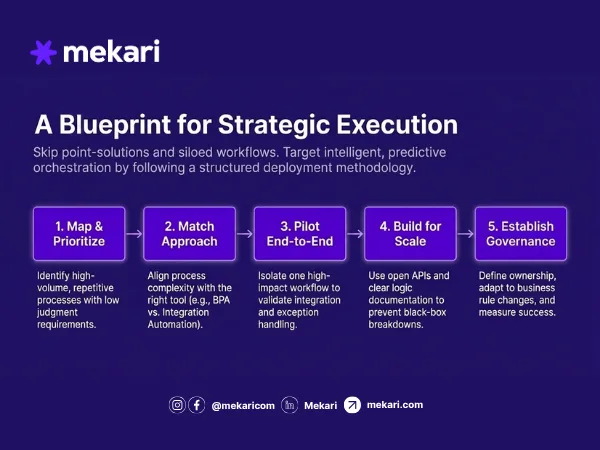
Start by identifying processes that are repetitive, high-volume, and prone to error or delay. Not every process is worth automating. High frequency processes with low need for human judgment will be the best choice.
Once mapped, you can prioritize those choices based on two aspects, potential impact on cost or time, and implementation complexity.
2. Match the Approach to the Process
Different processes call for different types of automation. Basic task automation suits single-step, rule-based actions, whereas BPA fits multi-step workflows that cross departments.
On the other hand, integration automation addresses data consistency across systems.
Finally, reserve intelligent automation for processes where decision-making cannot be reduced to fixed rules.
3. Start with a Pilot, Not a Full Rollout
Select one high-impact, well-documented process and automate it end-to-end before expanding. A contained pilot surfaces integration issues, exception handling gaps, and change management challenges at a manageable scale. Measure time saved, error rate reduction, and process cycle time before scaling.
4. Build for Scale from the Beginning
Design workflows with scalability in mind from the start. This means choosing platforms with open API support, documenting logic clearly so workflows can be maintained and modified.
Companies also need to establish ownership so automation does not become a black box that breaks when its original builder moves on.
5. Establish Governance
Automation without governance creates new risks: workflows break when business rules change, exceptions go unhandled, and no one owns the outcome.
Governance also determines whether automation delivers provable value — defining how performance is measured, what success looks like, and how results are reported to leadership. This last point matters more than most organizations realize.
According to Gartner, less than 20% of organizations have mastered the measurement of their automation initiatives, meaning the majority are running automation programs without a clear view of whether they are actually working.
Benefits of Enterprise Automation
Because it is implemented at the organizational level, enterprise automation delivers impacts that compound over time. The more functions the automation connects, the greater the operational leverage.
- Cost efficiency: Automating high-volume, transaction-heavy processes removes direct labor costs and reduces the indirect cost of errors, delays, and rework.
- Time savings: Repetitive, low-judgment tasks are handled by the system, freeing employees to focus on work that requires analysis, creativity, or decision-making.
- Accuracy and consistency: Automated systems execute tasks the same way every time, eliminating variation that is inherent in manual handling — critical in compliance-sensitive processes like invoice matching, expense reporting, and audit trails.
- Scalability: Once a workflow is validated, it handles multiples of its original volume without structural changes or proportional headcount growth.
- Operational visibility: Every transaction, approval, and handoff is logged and traceable, giving leadership a real-time picture of workflow performance across functions.
These benefits materialize across every major business function in the company, from finance and HR to operations and IT.
What the data shows?
- When AI is incorporated into enterprise automation workflows, the productivity gains become measurable at the individual level. A Gartner survey of over 5,000 digital workers found that employees saved an average of 3.6 hours per week after using AI in their automation.
- For organizations that extend AI-driven automation into supply chain and back-office operations, BCG research found reductions in manufacturing, warehousing, and distribution costs of 10% to 20%.
Read More: Generative AI in Financial Services: The $340B OpportunityEnterprise Automation Use Cases by Department
Enterprise automation applies differently depending on the function. Below are the most common use cases by department, with one concrete workflow example per area.
1. Finance
Finance handles the highest volume of structured, rule-based transactions in most organizations, making it one of the most automation-ready functions.
- Invoice processing and three-way matching.
- Expense report submission, flagging, and approval.
- Financial close and reconciliation workflows.
- Automated financial reporting and distribution.
For example, when a vendor invoice is received, the system automatically matches it against the purchase order and delivery receipt — scheduling payment if all three align, or routing discrepancies to the relevant approver without manual intervention.
2. HR and People Operations
HR processes are high in volume, repetitive in structure, and directly affect employee experience, three factors that make automation impact immediately visible.
- Employee onboarding end-to-end workflow.
- Leave and absence request routing and approval.
- Payroll data sync across HRIS and payroll systems.
- Offboarding and access revocation.
A new hire confirmation in the HRIS can trigger account provisioning, equipment requests, payroll sync, and a manager onboarding checklist simultaneously, replacing what would otherwise be a chain of manual handoffs across three or four teams.
3. Operations and Supply Chain
Operations processes involve multiple systems, vendors, and teams, making integration automation and workflow orchestration particularly high-impact here.
- Inventory level monitoring and reorder triggers.
- Procurement workflow from request to PO approval.
- Vendor communication and status updates.
- Delivery routing and logistics coordination.
For example, when inventory for a SKU drops below a defined threshold, the system generates a purchase request, routes it for approval, and sends a PO to the preferred vendor without requiring anyone to manually monitor stock levels.
4. IT and Systems
IT operations involve high volumes of repetitive requests that consume disproportionate time relative to their complexity.
- User account provisioning and access management.
- Helpdesk ticket classification and routing.
- System health monitoring and incident alerts.
- Software license tracking and renewal workflows.
What typically takes days of back-and-forth between HR and IT can be reduced to minutes: a role change in the HRIS automatically triggers access updates, account creation, and employee notification across all relevant platforms.
What to Look for in an Enterprise Automation Platform or Partner
Choosing an enterprise automation platform or partner is an infrastructure decision, not a software purchase. The wrong choice creates technical debt, limits scalability, and forces costly migrations down the line. These are the criteria that matter most.
1. Core automation functionality
Evaluate whether the platform can handle the full range of automation types your organization needs — from basic task automation and BPA to integration and intelligent workflows.
A platform that only covers one area will force you to bolt on additional tools as your program grows.
2. Integration capability
Enterprise automation only delivers its full value when all of your systems can be connected into a single unified ecosystem.
Therefore, look for native connectors to your existing tools, open API support, and compatibility with your ERP, HRIS, and finance systems.
3. AI and intelligent automation capability
Not all platforms handle automation at the same level of sophistication. Evaluate whether the platform supports AI-powered decision-making, exception handling, and adaptive workflows — not just rule-based task execution.
This determines how far the platform can take you as your automation program matures.
4. No-code and low-code capability
Platforms that require developer involvement for every workflow change create bottlenecks and slow down iteration.
No-code and low-code interfaces allow operations and business teams to build, modify, and maintain workflows without depending entirely on IT.
Read More: Top 9 Enterprise Low Code Platform to Accelerate Development 70%5. Scalability
At the enterprise level, the automation platform should handle growing transaction volumes and expanding workflows without requiring architectural changes.
Evaluate how it performs at two to three times your current operational scale, not just your current needs.
6. Security and compliance
For enterprise use, ISO 27001 certification is a baseline, not a differentiator.
Evaluate how the platform handles data residency, access controls, audit logging, and compliance with regulations relevant to your industry and geography.
7. Vendor support and implementation expertise
The platform itself is only part of the equation. Assess whether the vendor offers structured onboarding, dedicated support, and implementation services for organizations that need managed deployment rather than self-service setup.
8. Engagement model
Some organizations need a platform they can build on independently. Others need a partner that handles design, implementation, and ongoing optimization on their behalf.
Clarify upfront whether the vendor supports both models, and whether they can transition between them as your internal capabilities grow.
In conclusion, the right automation platform or partner does not just automate what your enterprise has today.
It gives your organization the infrastructure and support to keep building as operational complexity grows.
Automate Your Enterprise Operations with Unified Software Ecosystem
Enterprise automation works best when your tools work together. Fragmented systems, even if each one is automated individually, still create data silos, manual handoffs, and blind spots across departments.
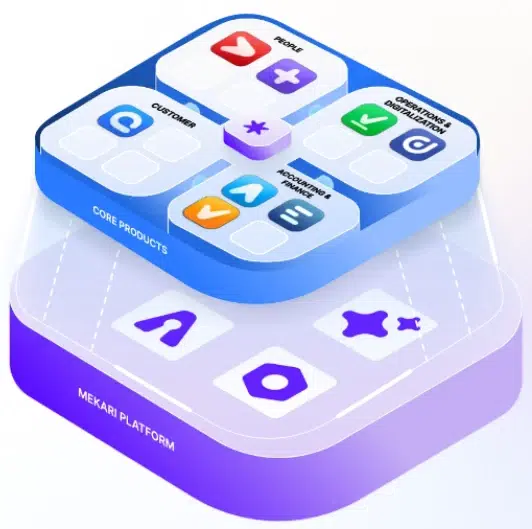
Mekari unified software ecosystem is built to close that gap, bringing together HR, finance, operations, expense management, and custom workflow automation in one integrated platform.
Three capabilities sit at the core of this unified system, such as:
- Operational automation: Reduces manual work and accelerates repetitive business processes across functions.
- Seamless integration: Connects every business function through Mekari’s suite of products, operating as one unified ecosystem rather than a collection of separate tools.
- Intelligent reporting: Consolidates data across Mekari products and transforms it into actionable insights for faster, more informed decision-making.
Whether your team wants to build and manage workflows independently or needs a partner to handle implementation end-to-end, Mekari supports both.
Automate, integrate, and scale your enterprise operations with Mekari unified software ecosystem.
References and methodology
Methodology
Methodology
Articles published by Mekari Desty are developed using trusted sources, including official data, company reports, academic research, and insights from industry practitioners. Whenever possible, we refer directly to primary sources before drawing conclusions. Our editorial team reviews and verifies the information to ensure accuracy and relevance. All references are listed so readers can trace each piece of information back to its original source.
Our editorial standards
Our editorial standards
- Primary source first: We consult official product documentation and pricing pages directly, not secondhand summaries or aggregator sites.
- Fact-checking: All product features, pricing, and claims are cross-verified against each platform’s official website at the time of writing.
- No paid placement: Tools are selected based on relevance and fit for Indonesian businesses, not commercial arrangements. Mekari Desty is included as a first-party product and is transparently labeled as such.
- Regular review: Articles are periodically updated to reflect product changes or shifts in market relevance.
References
References
Oracle Netsuite. “What Is Enterprise Automation? Examples & Types”
Gartner. “Gartner Identifies Four Emerging Challenges to Delivering Value from AI Safely and at Scale”

