


Mekari Insight
- Document management system (DMS) is a digital solution that helps organizations capture, store, organize, and retrieve documents across their entire lifecycle — from creation and editing to version tracking, approvals, and archiving. DMS adds real structure and control through metadata tagging, audit trails, retention policies, and automated workflows, ensuring documents are not just stored, but actively managed in a consistent and traceable way.
- Document chaos has a measurable price tag. The average knowledge worker loses 2.5 hours daily just searching for information — that’s a 21.3% productivity hit costing businesses up to $19,732 per employee per year. Scattered files, missing versions, and manual handoffs aren’t minor inconveniences; they’re a structural drain on your organization’s output.
- Most DMS platforms come with rigid templates and fixed workflows that may not match how your organization actually operates. Mekari Officeless, part of Mekari unified software ecosystem, flips this — offering a prebuilt, enterprise-ready DMS that can be fully configured to your existing SOPs, approval structures, and document governance rules, without months of custom development.
Most organizations today are dealing with the same problem: documents everywhere. Contracts in email, SOPs in shared drives, reports saved locally, all scattered and hard to track. Finding the right file (and the latest version of it) often takes more time than it should.
As teams become more distributed and workflows more digital, this starts to slow everything down. Collaboration gets messy, approvals take longer, and keeping documents organized, let alone compliant, becomes a constant challenge.
That’s where cloud based document management systems come in. But with so many options available, choosing the right one isn’t always straightforward. In this article, we’ve rounded up 12 of the best solutions to help you find what fits your needs.
What is a document management system (DMS)?
A document management system (DMS) is a digital solution that helps organizations capture, store, organize, and retrieve documents throughout their entire lifecycle, from creation and editing to version tracking, approval workflows, and final archiving.
More than just cloud storage, a cloud based document management system adds structure and control. It enables versioning, metadata tagging, audit trails, retention policies, and automated workflows, so documents are not only stored, but also managed in a consistent and traceable way.
Most modern DMS platforms also integrate with tools businesses already use, such as CRM, ERP, and email systems, ensuring the right people can access the right document at the right time, without manual handoffs or confusion.
Read more: What Is a File Management System and Why Your Business Needs OneThe importance of document management system for your business
Poor document management quietly drains time, money, and productivity across the organization. The impact is bigger than most teams realize, especially as document volumes continue to grow.
1. Time lost searching for information
The average knowledge worker spends around 2.5 hours per day (30% of their time) just looking for information.
This inefficiency alone contributes to a 21.3% productivity loss, costing businesses up to $19,732 per employee each year, according to Ripcord.
2. Hidden costs from disorganized documents
Unstructured document systems create ripple effects across the business:
- Fortune 500 companies lose an estimated $12 billion annually due to document inefficiencies (SignHouse)
- 5 out of 6 employees have had to recreate missing documents (Foxit)
- Valuable time is spent on repetitive work instead of strategic tasks
3. Productivity gains with the right system
On the flip side, companies that implement a proper DMS see measurable improvements, according to Keevee:
- Up to 60% increase in productivity with digital document workflows
- Potential savings of up to $20,000 per employee annually
- Faster collaboration, approvals, and decision-making across teams
In short, a document management system helps turn scattered information into a structured, reliable asset, so teams can spend less time searching and more time getting work done.
Read more: Best 10 AI Software to Boost Productivity in BusinessTop document management system recommendation for enterprise
Here are some of the top cloud based document management system recommendations for enterprises, each with different strengths depending on your needs.
1. Mekari Officeless
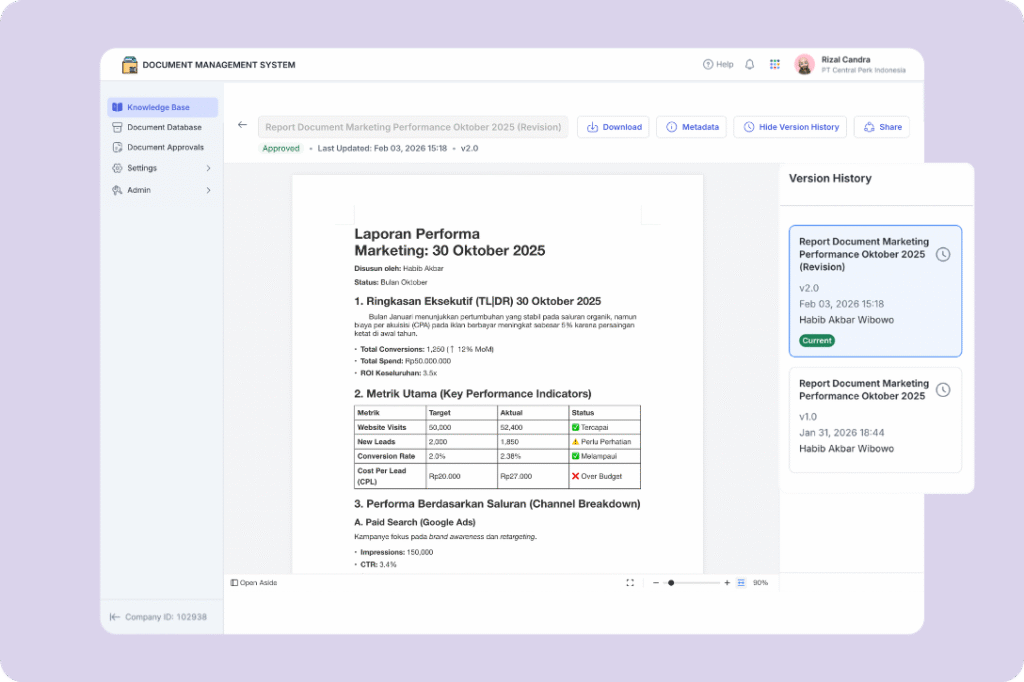
Mekari Officeless is a platform that democratizes the creation of business applications, workflow automation, and analytics — part of Mekari unified software ecosystem.
It enables companies to build and deploy solutions through prebuilt apps, workflow templates, public API plugins, and full custom development, all designed to support scalable business growth.
Unlike typical document management systems, Mekari Officeless provides a prebuilt Document Management System that can be deployed quickly without long development timelines. More importantly, it stands out because the system can be fully adapted to match your existing SOPs and document workflows — not forcing your business to adjust to rigid software structures.
Key features
- Knowledge base & self-service portal
Centralized digital library for policies, guidelines, and documentation, with categorized navigation, secure publishing (only approved content visible), and built-in document preview for easy access without downloads. - Centralized document database & control
Acts as a single source of truth with hierarchical folder structures, granular permissions, and the ability to track both digital and physical documents, including enforced relationships between critical files. - Automated approval & workflow orchestration
Replaces manual processes with configurable workflows, including multi-stage approvals, conditional routing, role segregation (preparer vs requestor), and structured feedback loops. - Native authoring & version control
Built-in editor and templates for standardized document creation, with automatic versioning (minor and major), and system-generated document numbering based on company rules. - Auditability & secure distribution
Immutable audit trails for every activity, secure external sharing with controlled access, and automated deprecation to ensure only the latest document versions are used.
Best for: Enterprises that need a flexible, SOP-aligned document management system with fast deployment — especially those looking to avoid long development cycles while still getting a fully customizable solution.
2. M-Files
M-Files organizes documents based on what they are, not where they’re stored. Its metadata-first approach enables smart search, duplicate detection, and policy-driven workflows that reduce human error.
The platform has also been recognized as Gartner Peer Insights Customers’ Choice (2025), reflecting strong user satisfaction across industries.
Key features
- Metadata-driven organization and smart search
- Duplicate detection to avoid redundant files
- Policy-based workflows to reduce manual errors
- Strong governance and compliance controls
Best for: Organizations that prioritize automation, governance, and want a solution with strong analyst recognition.
3. Microsoft SharePoint
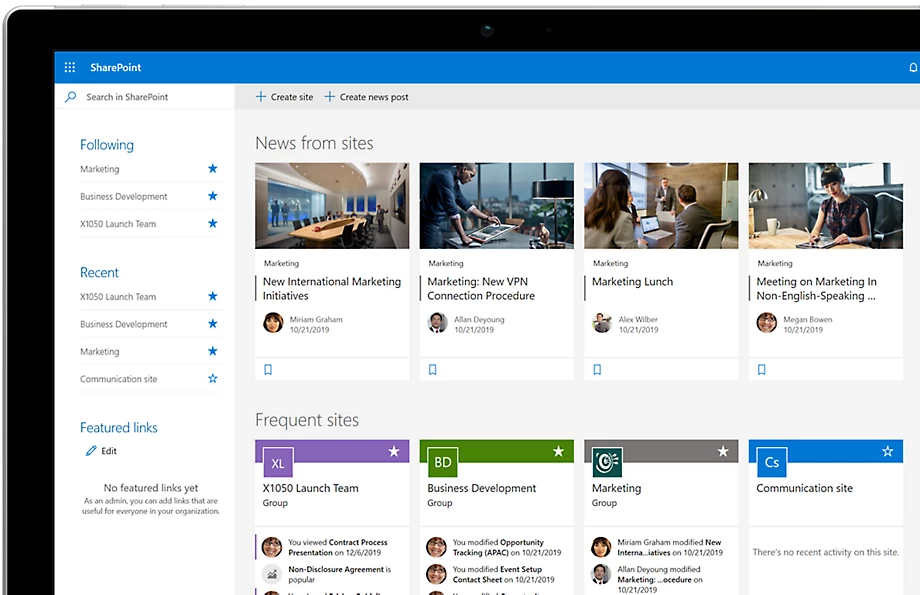
Microsoft SharePoint is a robust document management platform within the Microsoft ecosystem, offering centralized storage, collaboration, and enterprise-grade governance.
Its deep integration with Microsoft 365 makes it one of the most widely adopted DMS solutions for enterprises already using Microsoft tools.
Key features
- Document libraries for centralized storage
- Workflow automation for approvals and reviews
- Advanced search across documents and metadata
- Integration with Microsoft 365 tools
- Retention, eDiscovery, and records management via Microsoft Purview
Best for: Microsoft-first organizations that want seamless governance and document control within their existing tools.
4. Box
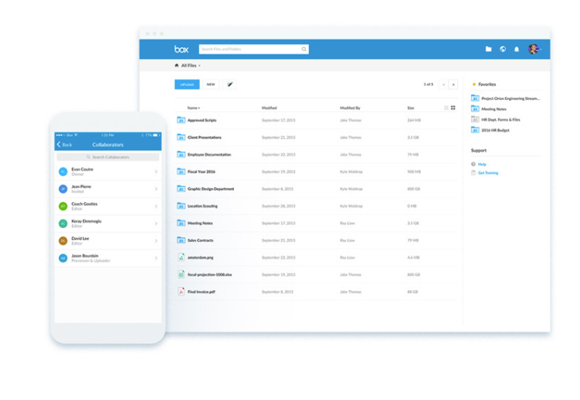
Box is designed for secure collaboration across teams and organizations, combining file sharing with enterprise-level security and integrations. It has been named a Leader in Document Management by Gartner (2024) and continues to expand its capabilities with AI-powered metadata and search features.
Key features
- Secure file sharing and collaboration
- 1,500+ integrations with business tools
- Box AI for metadata extraction and smarter search
- Advanced access controls and audit trails
Best for: Enterprises needing a centralized hub to manage, share, and govern documents across internal teams and external partners.
Read more: 7 Best AI & Workflow Automation SaaS Tools5. Google Workspace (Google Drive)
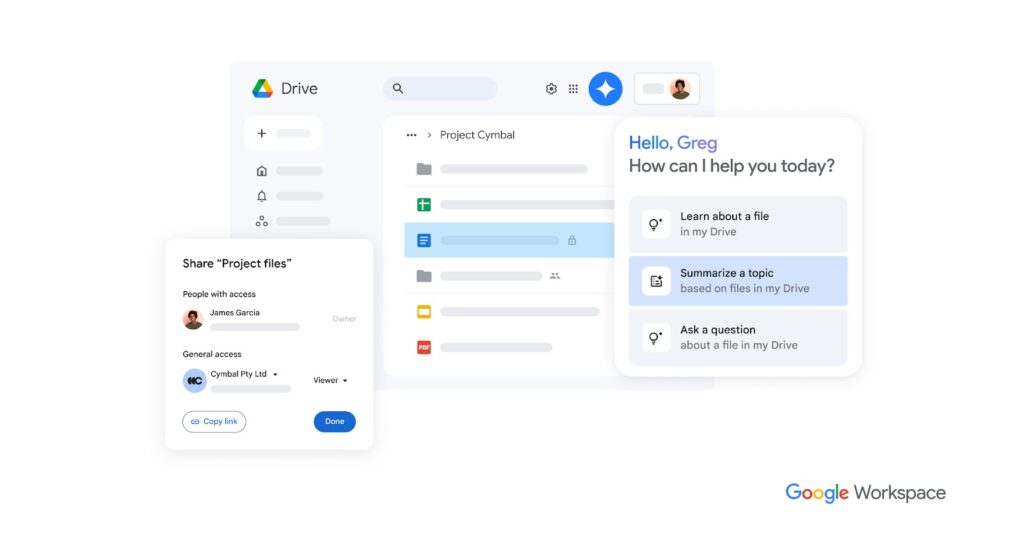
Google Drive offers a simple, collaborative document management experience, enhanced with AI and deep integration with Google’s productivity tools.
Its widespread adoption is driven by ease of use and strong real-time collaboration features, especially for distributed teams.
Key features
- Real-time collaboration and editing
- AI-powered file organization and search
- Integration with Docs, Sheets, and Slides
- Information rights management
- Gemini AI for advanced document interactions
Best for: Teams that prioritize collaboration and simplicity, especially those already using Google Workspace.
6. Laserfiche
Laserfiche is an enterprise content management platform focused on digitizing documents and automating workflows.
It is particularly well-known for its strong compliance capabilities, making it a trusted solution in regulated industries such as government, healthcare, and finance.
Key features
- OCR for converting paper into searchable files
- Workflow automation and e-forms
- AI-powered document summarization
- Audit logs and granular access control
- Records lifecycle management and legal hold features
Best for: Organizations in regulated industries that need compliance-heavy document management at scale.
Read more: How to Go Paperless Without the Hassle of Digitizing Documents7. DocuWare
DocuWare specializes in automating document-heavy processes, especially for businesses transitioning from paper to digital workflows. It stands out for its strength in invoice processing and intelligent document handling using AI and OCR technologies.
Key features
- Intelligent document processing (OCR + HTR)
- Automated data extraction and indexing
- Workflow automation for approvals
- Centralized document repository
- Cloud and on-premise deployment options
Best for: Mid-size to large businesses with heavy paper-based processes that need strong automation and flexible deployment.
8. Dropbox
Dropbox is a widely used document management and file-sharing platform known for its simplicity and intuitive user experience. Its familiarity across teams makes adoption easy, while still offering solid collaboration and integration capabilities.
Key features
- File syncing and sharing across devices
- Version control and file recovery
- OCR capabilities
- Role-based access management
- Integration with various third-party tools
Best for: Teams looking for a simple, easy-to-use platform with reliable collaboration features.
9. Revver
Revver combines document management with business process automation, helping teams manage large volumes of unstructured documents.
Its strength lies in blending AI-powered classification with no-code workflows, reducing manual setup and operational complexity.
Key features
- AI-powered document classification (Smart Extract)
- Automated filing and metadata tagging
- No-code workflow automation
- Granular permissions and audit trails
- Integration with Microsoft 365 and Google Workspace
Best for: Teams handling high volumes of unstructured documents that want automation with minimal technical effort.
10. PandaDoc
PandaDoc focuses on document workflows for sales and business transactions, combining document creation, collaboration, and e-signature in one platform.
Its built-in analytics also provide visibility into how recipients interact with documents during negotiations.
Key features
- 750+ customizable templates
- Built-in eSignature functionality
- Real-time collaboration and commenting
- Document tracking and analytics
- Workflow automation for approvals
Best for: Sales and marketing teams managing contracts, proposals, and client-facing documents.
11. ClickUp
ClickUp Docs integrates document management directly into a project management platform, connecting documents with tasks and workflows. This makes it easier for teams to manage work and documentation in one place without switching tools.
Key features
- Docs, tasks, and dashboards in one platform
- Link documents to tasks and assign action items
- Real-time collaboration
- Centralized workspace for projects and files
- Workflow and task automation
Best for: Small to mid-sized teams that want document management tightly integrated with project execution.
12. Folderit
Folderit offers a straightforward, compliance-ready DMS designed for fast adoption.
With support for ISO 27001, GDPR, and HIPAA standards, it provides a balance between usability and security, especially for teams that need quick implementation without complexity.
Key features
- Document capture, organization, and approval workflows
- Built-in e-signature capabilities
- Team-based pricing with generous storage
- Compliance-ready infrastructure
- SSO integration (Microsoft Entra ID, Okta)
Best for: SMBs and nonprofits that need a user-friendly, secure DMS that can be implemented quickly.
Best custom document management system recommendation
For enterprises with complex workflows, strict compliance requirements, and unique document governance structures, a one-size-fits-all DMS often falls short. What’s needed is a solution that can adapt to the way your organization already operates, not the other way around.
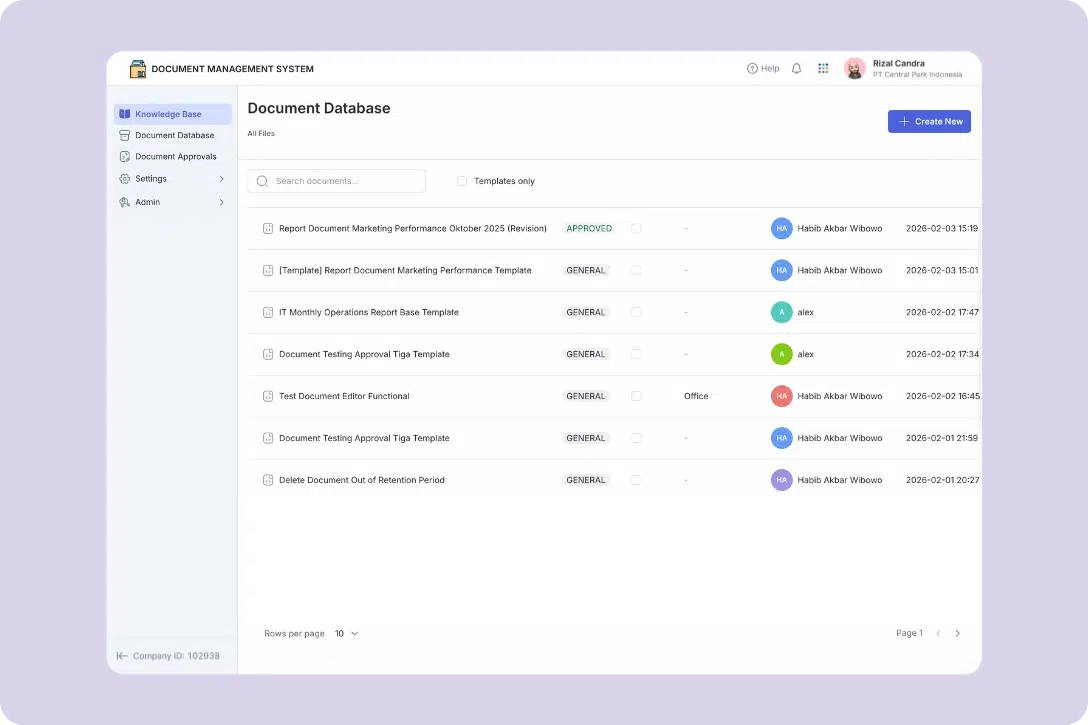
Mekari Officeless stands out as the best prebuilt app provider for a custom document management system. As part of the Mekari unified software ecosystem, it seamlessly connects with other business functions, from HR and finance to CRM and operations, creating a more integrated and efficient workflow across the organization.
It offers the best of both worlds: a ready-to-use DMS that can be deployed quickly, while still being fully configurable to match your existing SOPs, approval flows, and document structures. Unlike off-the-shelf tools with rigid templates, Mekari Officeless allows you to build a system that aligns deeply with your operational needs, without going through months of custom development.
If your organization is looking for a DMS that is more flexible, secure, and scalable, Mekari Officeless provides a practical path to get there faster.
References
Folderit. ”Top 10 Best Document Management Systems: Smart Picks For Speed, Security, And Scale”
Ripcord. ”The True Cost of Poor Document Management”
SignHouse. ”Document Management Industry Revenue and Growth Statistics”
