


Mekari Insight
- Your development model should match how your business actually operates today. Traditional systems still deliver where requirements are fixed and compute demands are high, but for most modern enterprises, distributed teams, fast-moving markets, and growing data needs have made web-based development the more practical default.
- The cost gap is wider than most teams realize. Beyond the obvious hardware savings, web-based systems reduce the compounding costs of manual updates, version inconsistencies, and OS-specific builds, with organizations reporting 30–40% savings compared to on-premise infrastructure.
- The barrier to web-based development is lower than you think, if you use the right platform. Custom web development doesn’t have to mean a long, expensive build cycle. Platforms like Mekari Officeless let enterprises build scalable, web-based business applications using visual logic builders and pre-built templates, so teams can go from idea to accelerated implementation, without bottlenecks.
For years, locally installed software powered business operations because it was reliable and purpose-built. But as teams become distributed, data grows, and products evolve faster, many of these systems are starting to show their limitations.
This leaves businesses with a key question: stick with traditional systems or move to web-based development? This guide breaks down both approaches — from architecture to cost, scalability, and security — to help you choose the right one.
What is traditional systems development?

Traditional systems development refers to software built to run locally on a user’s device or within an organization’s internal network (LAN/WAN), where data processing and storage happen on-premise.
These systems are typically platform-specific, meaning applications must be developed separately for operating systems like Windows, macOS, or Linux — resulting in different development and maintenance cycles.
Most traditional systems follow the Waterfall development model, a linear process that moves through fixed stages: Requirements → Design → Build → Test → Deploy. As of 2025, about 22% of legacy systems still rely on the Waterfall methodology.
Common examples include desktop ERP systems, installed accounting software, legacy CRM tools, government databases, and manufacturing execution systems (MES). A key limitation is rigidity. Once a stage is completed, going back to revise earlier steps becomes costly and time-consuming, making it less suitable for evolving requirements.
Read more: Guide to Choose Low Code vs Traditional DevelopmentWhat is web-based systems development?
Web-based systems development refers to applications that run on remote servers and are accessed through a web browser such as Chrome, Firefox, or Edge — without requiring installation on a user’s device. Instead of running locally, the application, its data, and core logic are hosted in the cloud.
This model represents a shift in architecture: the web is treated as the primary platform, not just a communication layer. Because requirements often evolve, development typically follows iterative methods like Agile, Scrum (2–4 week sprints), and DevOps. In fact, 68% of businesses have adopted Agile methods in their software development workflows.
The shift to web-based systems also aligns with cloud adoption. According to Gartner, 95% of new digital workloads are expected to run on cloud-native platforms by 2025.
Read more: Enterprise Software Development Guide: The 2.5-Year ROI PathKey differences between traditional and web-based systems development
Understanding how these two approaches differ helps organizations choose the development model that best fits their operational needs and growth plans.
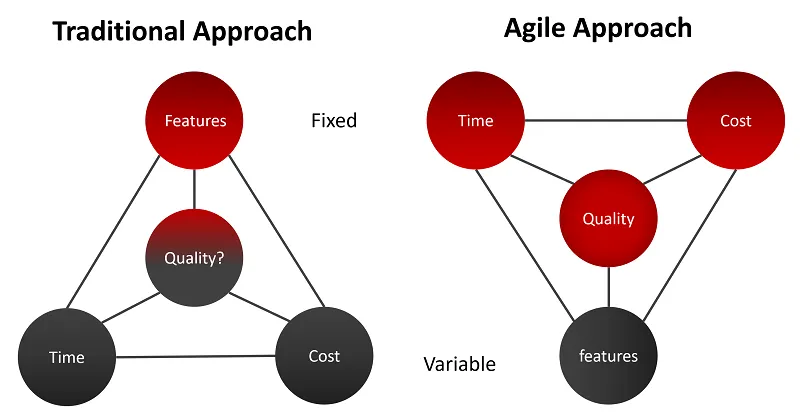
1. Development approach & methodology
Traditional: Uses a linear Waterfall model, where phases, requirements, design, build, test, and deploy, must be completed sequentially with limited ability to revisit earlier stages.
Web-based: Typically follows Agile or Scrum, where development, testing, and improvements happen iteratively in short sprints with continuous feedback. This approach is proven to be more efficient, Agile projects are about 20% faster and achieve a 64% success rate, compared to 49% for Waterfall projects.
Read more: How to Accelerate Agile Software Development with Low Code2. Platform & architecture
Traditional: Designed for local networks with OS-specific clients, meaning applications must be built separately for Windows, macOS, or Linux. The client-server environment is relatively static.
Web-based: The web browser becomes the universal client, making applications hardware-agnostic. Development focuses on cross-browser compatibility (Chrome, Safari, Firefox) instead of building separate versions for different operating systems.
3. Deployment & updates
Traditional: Software updates must be installed individually on each user’s device, which can be slow, costly, and prone to version inconsistencies across teams.
Web-based: Updates are deployed centrally on the server, so every user automatically accesses the newest version as soon as it goes live, eliminating manual installation and reducing operational overhead.
4. Accessibility & remote work
Traditional: Often tied to specific devices or internal networks, requiring VPNs or additional infrastructure for remote access.
Web-based: Accessible anywhere through a browser and internet connection, making it naturally suited for remote and distributed teams. This is increasingly important as 64% of SMBs say cloud and web platforms are essential for remote work and collaboration.
5. Scalability
Traditional: Scaling requires purchasing additional servers and infrastructure, which can be expensive and slow to implement.
Web-based: Built on cloud infrastructure, allowing systems to scale storage and computing resources up or down as needed. In fact, 87% of organizations cite scalability and flexibility as the main drivers for adopting cloud platforms.
6. Cost structure
Traditional: Involves high upfront investment, including hardware procurement, infrastructure setup, and per-device software licensing, along with ongoing maintenance costs.
Web-based: Usually follows a subscription-based model, with lower initial costs, no hardware purchase, and updates included in the service. Organizations migrating to cloud systems report average cost savings of 30–40% compared to traditional on-premise infrastructure.
7. Performance
Traditional: Because processing happens locally, these systems often deliver strong performance for compute-heavy workloads such as graphics rendering or large-scale data processing.
Web-based: Performance depends on internet connectivity and server infrastructure, although technologies like CDN networks and edge computing are rapidly narrowing the performance gap.
Pros & cons traditional systems development
Traditional systems development offers strong performance and control, but it often comes with higher operational complexity and limited flexibility.
Pros
- Excellent performance for resource-intensive or compute-heavy applications because processing happens locally without browser overhead or network latency
- Works fully offline, making it suitable for environments with unreliable or restricted internet access
- Mature and predictable methodology, the Waterfall approach is easier to manage when project requirements are clearly defined from the start
- Greater control over data, since information is stored on the organization’s own servers, which is useful for industries with strict data residency requirements
Cons
- High upfront costs for infrastructure, hardware, and software licensing, plus long-term maintenance expenses
- Complex update process, every machine must be updated individually, which can create version inconsistencies
- OS-specific development, requiring separate builds and testing for Windows, macOS, and Linux
- Limited flexibility, the Waterfall model makes it costly to revise requirements once development has started
Pros & cons web-based systems development
Web-based systems prioritize accessibility, scalability, and faster iteration, though they introduce different operational and technical considerations.
Pros
- Accessible from any device with a browser, enabling remote work, distributed teams, and 24/7 access
- Centralized updates, where all users automatically access the latest version once it is deployed
- Faster time-to-market, about 78% of cloud-using organizations report faster product launches.
- Real-time collaboration, allowing multiple users to work on the same data simultaneously
- Easy integration with third-party tools through APIs and modern web services
Cons
- Dependent on internet connectivity, making the system less reliable in areas with unstable infrastructure
- Dynamic environments (browser updates, OS changes, network conditions) require more frequent maintenance
- User navigation behavior such as refreshing pages or using the back button must be carefully handled in development
- More complex security management, since data is stored on cloud servers and requires strong encryption and access controls
Web-based systems is the smarter choice for enterprises that want to scale
The comparison throughout this article shows that for enterprises aiming to grow quickly and operate efficiently, web-based systems development offers clear advantages over traditional approaches.
Key reasons include:
- Faster deployment and iteration: Web-based systems allow continuous updates and improvements without reinstalling software on every device
- Lower operational costs: No need for extensive on-premise infrastructure or per-device maintenance
- Greater accessibility: Applications can be accessed from anywhere through a browser, enabling remote and distributed teams
- Built-in scalability: Cloud infrastructure allows systems to scale resources up or down as demand grows
There are still a few scenarios where traditional systems remain relevant:
- Compute-heavy applications that rely on high local processing power
- Strict data residency requirements that prohibit cloud storage
- Systems with fixed requirements that are unlikely to change over time
However, these cases are becoming increasingly rare for modern enterprises. For most organizations today, the real question is no longer whether to adopt web-based systems, but how quickly they can transition: and that depends on having the right platform to build, iterate, and scale without bottlenecks.
Mekari Officeless as web-based systems development solution for enterprise
While transitioning from traditional systems to web-based development makes sense in theory, many enterprises face the same challenge in practice: custom web development is expensive, time-consuming, and requires a dedicated engineering team. When requirements change — which they often do — the development cycle can restart, slowing down innovation.
This is the gap that Mekari Officeless is designed to solve. Mekari Officeless is a platform that democratizes business app creation, workflow automation, and analytics, enabling organizations to build solutions that support scalable growth without complex development processes.
Instead of choosing between building a traditional system from scratch or commissioning a full custom web development project, Mekari Officeless offers a third option:
- Build web-based applications faster using pre-built templates and visual logic builders
- Automate business workflows across departments without heavy coding
- Scale and adapt systems easily as business requirements evolve
With Mekari Officeless, enterprises can launch functional web-based systems in a fraction of the time, helping teams move from idea to implementation faster.
Referensi
Aezion. ‘’The Benefits of Web-Based Systems for Business’’
Studocu. ‘’traditional vs webbased software development – Environmental Health (PBHL 6501)’’
