




Mekari Insight
- No-code CRM builders represent a configurable approach to the automation of CRM processes and the standardization of customer data management within enterprise environments.
- The adoption of no-code architectures contributes to accelerated system development cycles (20–40%) and the optimization of long-term maintenance overhead.
- As an enterprise software development platform, Mekari Officeless enables the configuration of integrated CRM architectures aligned with organizational workflows and data structures without dependency on traditional development layers.
Managing customer relationships manually consumes team time just for data input and follow-up coordination. For mid-sized to large businesses, this inefficiency can result in missed deals and scattered, unstructured customer data.
It is reported that 43% of businesses state that CRM software reduces employee workload by 5 to 10 hours per week. – CRM.ORG
As a solution, no-code CRM builders help teams design fully functional and fully customized CRM systems using drag-and-drop tools, ready-to-use templates, and seamless integrations.
This guide will discuss what a no-code CRM builder is, its features and benefits, and how it works to support daily operations.
What is a no-code CRM builder?

A no-code CRM builder is a platform that standardizes customer relationship management across the sales lifecycle across every stage of the sales pipeline. Businesses can fully customize their CRM systems without technical knowledge, through declarative configuration models that abstract underlying programming complexity.
Unlike off-the-shelf CRMs such as Salesforce or HubSpot that require alignment to predefined system architectures to predefined templates, no-code CRM builders allow businesses to build CRM systems that align with their own workflows.
Common core components include:
- Contact and customer database management
- Customizable deal pipelines
- Automation workflows
- Reporting and analytics dashboards
- Integration with tools already used by the team
No-code CRM builders offer a middle ground. These tools enable non-technical users such as sales operations managers to build what they need through a drag-and-drop interface, enabling configuration flexibility while optimizing total cost of ownership (TCO).
Worldmetrics reports that organizations using no-code tools can reduce application development time by 20–40% and reduce maintenance costs by 15–25%.
Features that can be built with a no-code CRM builder:
- Automated email and workflows: Send pre-prepared emails or newsletters automatically to prospects, customers, or contacts whenever needed.
- Lead and contact management: Organize all prospects, customers, and contacts into a centralized database accessible to the team in just a few clicks.
- Custom sales pipeline: Create sales pipelines tailored to products, target audiences, payment terms, and specific business needs.
- Reporting and analytics tools: Track all team interactions with clients from the first contact to closing.
Read more: Top 10 No-Code Database Software Builder for BusinessesHow a no-code CRM builder works
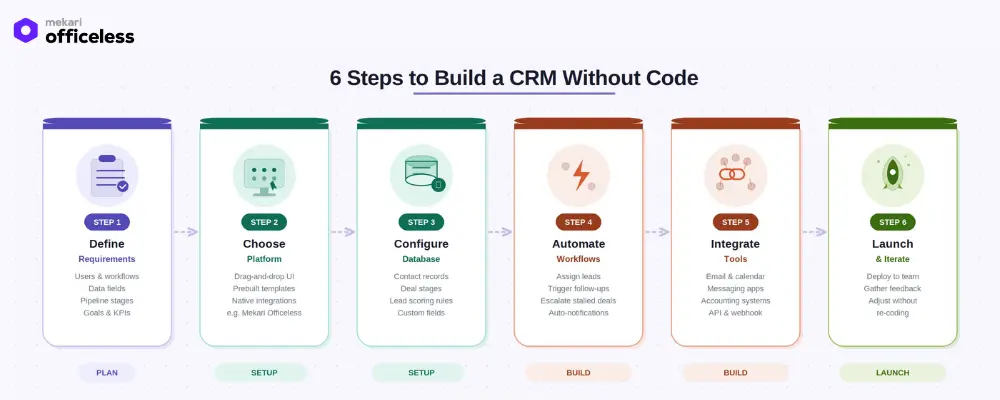
Below are the stages of how a no-code CRM builder supports the standardization and orchestration of business processes:
1. Define CRM requirements
Identify users, workflows, data fields, and pipeline stages required by the business before starting the build.
2. Choose the right no-code platform
Select a builder with a drag-and-drop UI, ready-to-use templates, and native integrations, such as Mekari Officeless with Qontak connector.
3. Configure the database
Set up contact records, deal stages, lead scoring rules, and custom fields visually without requiring manual schema engineering.
4. Build automation workflows
Automatically assign leads, trigger follow-up emails, and escalate stagnant deals through automated execution protocols.
5. Connect existing tools
Sync with email, calendar, messaging, and accounting systems via API or webhook.
6. Launch and iterate
Deploy to the team, gather feedback, and refine the CRM without requiring full system redevelopment cycles.
Read more: How SaaS CRM Boosts Sales and Transform Your BusinessNo-code CRM builder vs. traditional CRM
Traditional CRMs are generally designed for standard sales processes. However, when businesses have specific needs, generic CRMs are often not flexible enough.
| Aspect | Traditional / Off-the-Shelf CRM | No-Code CRM Builder |
| Setup time | Weeks to months | Hours to days |
| Technical requirement | Requires developers/IT team | Business users can build independently |
| Customization | Limited to vendor presets | Fully customizable |
| Cost | High license + implementation cost | Lower, usage-based |
| Integration flexibility | Pre-set integrations only | API, webhook, custom connectors |
| Update speed | Requires IT tickets + sprints | Self-serve, real-time |
| Scalability | Requires tier upgrades | Add modules as needed |
| Data ownership | Vendor-hosted, limited export | Flexible hosting |
| Data input error rate | Higher — manual input | Lower, automated capture |
| ROI speed | 12–18 months | AI-powered CRM: 30% ROI vs 20% traditional |
Key benefits of using a no-code CRM builder
Here are the key benefits businesses can gain from using a no-code CRM builder.
1. Cost efficiency
No-code CRM builders reduces dependency on dedicated development resources through configurable architectures for building and maintenance.
CRM automation saves employees 5–10 hours per week, which can be allocated to higher-value activities. – CRM.ORG
2. Accelerated innovation
When business teams can build their own tools, innovation cycles are accelerated through reduced dependency on centralized IT backlogs without waiting for IT sprint queues.
McKinsey found that organizations empowering citizen developers score 33% higher in innovation metrics.
3. Higher team adoption
Interfaces built for non-developers lead to higher adoption rates. Sales representatives prefer non-standardized or non-configurable systems, while complex CRMs often go unused despite being purchased.
4. Better customer retention
Financial service companies with integrated CRM systems achieve 45% higher customer retention compared to those without.
5. Flexibility when scaling
Add modules such as ticketing, project management, and field sales as the business grows without vendor lock-in or high additional implementation costs.
Use cases of no-code CRM builders
Here are some use cases for no-code CRM builders across various business functions.
- Sales teams: Build custom pipelines, automate lead assignments, and track deals without dependency on centralized development pipelines, supporting revenue pipeline governance and visibility rather than administration.
- Customer service: Create ticketing workflows, escalation rules, and SLA tracking connected directly to customer contact records for faster and more consistent responses.
- Omnichannel businesses in Indonesia: Connect WhatsApp, email, live chat, and social media into a single CRM with automation—highly relevant for Indonesia’s messaging-driven market.
- Multi-branch operations: Standardize customer data across locations with centralized role-based access and approval workflows.
- Finance & procurement teams: Track vendor relationships, contract updates, and payment follow-ups in a customized CRM view tailored to specific needs.
- HR & internal teams: Use no-code CRM logic to manage candidate tracking, onboarding workflows, and employee touchpoints.
Read more: CRM & Accounting Integration: Real Use Cases & Best SoftwareHow to choose a no-code CRM builder
When choosing the right platform, businesses need to understand the factors involved in determining whether the solution meets their needs.
1. Integration depth
A good platform must connect with tools already used by the team such as email, WhatsApp, and accounting systems. For businesses in Indonesia, support for WhatsApp Business API is a critical requirement that cannot be compromised.
2. Database flexibility
Ensure the platform allows custom fields, relational data, and unlimited record types so the CRM can truly align with business data structures.
3. Automation capabilities
Look for platforms that support conditional logic, scheduled triggers, and multi-step workflows, not just simple single-condition automation.
4. User permission control
Role-based access and multi-level approval workflows are essential for mid-sized to large teams with complex decision hierarchies.
5. Local support and compliance
For businesses in Indonesia, choose platforms with ISO 27001 certification and local data residency options to ensure compliance with data protection regulations.
6. Scalability model
Ensure the platform can grow with the business without significant cost increases as users or data scale.
How Mekari Officeless + Qontak helps build a no-code CRM?
Mekari Officeless is an enterprise software development platform, part of the integrated Mekari software ecosystem, designed for businesses that require fully customized and integrated systems aligned with existing operations.
Through the Officeless × Qontak connection, omnichannel CRM is embedded directly into your custom workflows without developers.
- Drag-and-drop app builder: Build CRM modules visually using blocks and ready-to-use templates without coding.
- Omnichannel integration via Qontak: Connect WhatsApp, live chat, email, and social media interactions directly into the CRM pipeline so all customer touchpoints are centralized in one system.
- Automation workflows: Trigger lead assignments, follow-up reminders, and escalations automatically without manual intervention.
- Simultaneous database setup: CRM databases are automatically generated during development, with the ability to create separate databases per module as needed.
- API, Event & Webhook support: Sync your CRM with Mekari Jurnal for accounting, HR systems, or third-party tools in real time without complex configuration.
- ISO 27001 certified: Enterprise-grade security with role-based access, audit logging, and OpenAPI support ensures customer data is protected according to international standards.
Ready to build a no-code CRM for your business? Explore the Officeless × Qontak solution and get started through a governed low-code/no-code architecture.
References
CRM.ORG. “45 CRM Statistics You Need to Know in 2026”
Worldmetrics. “No-Code Industry Statistics”
Mckinsey. “Developer Velocity: How software excellence fuels business performance”
Integrate.io. “ Salesforce Data Integration ROI Figures – 50 Statistics Every Business Leader Should Know in 2026”

